
 Need help?
Do you have a question about the ICON U-Solo Live and is the answer not in the manual?
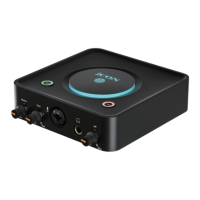
The ICON U.Solo Live is a USB 2.0 high-speed digital audio interface designed for professional recording and live streaming applications, offering 1 mic-in, 1 instrument-in, and 2 out capabilities with smart phone connectivity. This device provides rock-solid performance for both entry-level recordists and experienced studio producers, delivering high-quality audio with a 24-bit 192KHz sample rate.
The U.Solo Live serves as a versatile audio interface, supporting simultaneous Mac/PC and smart device connectivity. It enables 2x2 analog I/O full-duplex recording and playback. A key feature is its live streaming capability, where signals can be routed back to a PC/Mac via a digital Type C connector (OTG) or an analog 3.5mm stereo jack for real-time recording or further signal processing. The device can be directly connected to smartphones, tablets, or other devices. It includes mic/instrument preamps with individual gain control and a phantom power switch for condenser microphones. Two analog outputs are provided via 1/4" TRS jacks, along with one headphone output with assignable source and individual volume control. Flexible channel routing is managed through the ProDriver4 software control panel.
The U.Solo Live features a straightforward front panel with a master volume control for line outputs, an input gain level control for the microphone, and a 3-pin XLR input for condenser or dynamic microphones. A 1/4" stereo TRS headphone output with its own level control is also present. The top panel includes a Mic/Inst button to switch between microphone and instrument input modes, and a +48V phantom power button for condenser microphones.
The rear panel offers a USB Type C power supply connector, a USB 2.0 Type C connector for Mac/PC or iOS device connection (via camera kit), and a Smart Device I/O (Digital Type C & Analog 3.5mm TRRS) for simultaneous smart device and Mac/PC connectivity. A 3.5mm stereo connector provides unbalanced stereo output.
The device utilizes ICON Pro Audio's ultra-low latency ProDriver4™ driver, which includes an innovative and user-friendly plug-in hosting rack software for Windows and Mac. ProDriver4 offers a LoopBack function for both Mac and Windows platforms, allowing for flexible audio routing. The software control panel provides a matrix mixer interface to adjust input and output channel levels, route any input to any output, and save/load mixer presets. It also includes settings for sample rate (from 44.1KHz to 192KHz), latency (with options like Safe, Extra Large, Normal, Small, Very Small, Minimum, and Custom), ASIO buffer size (32 to 4096 samples), and streaming buffer size/volume.
The ProDriver hosting rack allows users to integrate VST, Audio Units, and Direct X plugins, either in standalone mode or with a DAW. Users can create sessions with unlimited presets, each supporting different plug-ins for desired sound effects. Presets can be duplicated, deleted, and grouped into categories like "Vocal," "Special," "MC," and "Others." The plug-in rack screen provides routing blocks for ProDriver Input, Output, MIDI Input, MIDI Output, Mute, and Voice Over functions, with intuitive drag-and-drop connection cables for routing.
To ensure proper operation and longevity, users are advised to retain the original packaging for potential servicing. When cleaning the device, only a dry or slightly damp soft cloth should be used. Ventilation openings should not be blocked. The device should be kept away from heat sources. The power cord should be protected from damage. In case of electrical shock risk, exposed wiring should not be touched while the unit is in operation. Only manufacturer-specified attachments/accessories should be used. The unit and connected electrical equipment should be unplugged during lightning storms or prolonged periods of disuse. All servicing should be referred to qualified personnel.
For dynamic microphone users, it's crucial to ensure the +48V phantom power switch is "OFF" before plugging in the microphone to prevent damage.
Software updates and support information, including FAQs, downloads, and forums, are available on the ICON Pro Audio online Help Center. Users can register their product to access drivers, firmware, user manuals, and bundled software. For defective products requiring service, users are instructed to ensure the problem is not operation-related, keep the owner's manual, and pack the unit in its original packaging (or a suitable alternative if lost) before shipping to an ICON tech support center.
 General
| Brand | ICON |
|---|---|
| Model | U-Solo Live |
| Category | Recording Equipment |
| Language | English |

 To Next Page











