iconBIT Toucan W Quick Start Guide Русский
8
2. About the Device
2.1. Remote Control
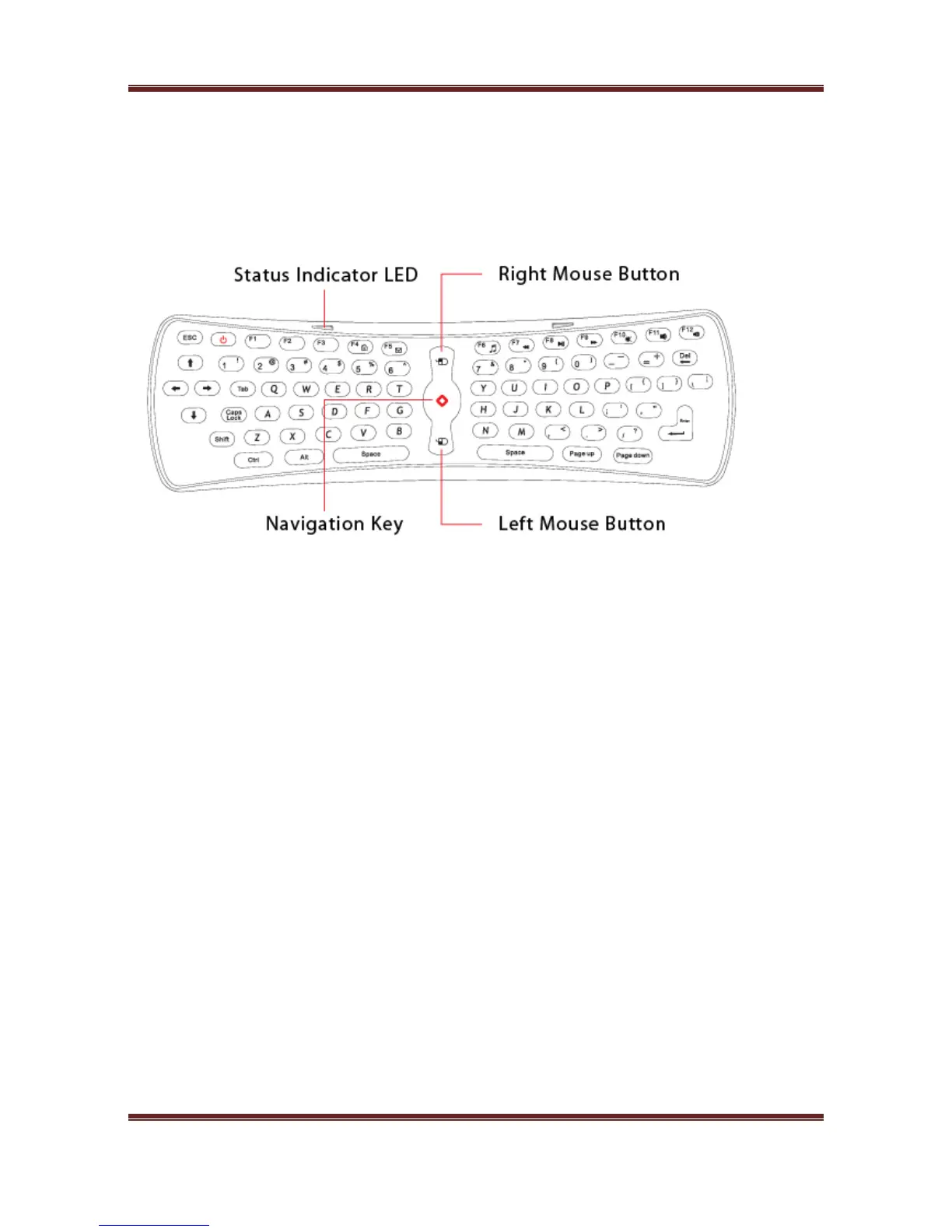
Remote control is a motion mouse with QWERTY keyboard.
2.1.1. Status Indicator LED
a. If the LED flickers, it means that the connection is unsuccessful;
If the LED keeps shining, it means that the connection is successful and Motion Mouse with
QWERTY Keyboard is ready to work.
b. Press one button on the keyboard, if the status indicator LED (4Hz) is flickering slowly, it
means that the connection is unsuccessful. If the LED keep shining, it means the connection
is successful and Motion Mouse with QWERTY is ready to work.
c. If none of the buttons on the keyboard has been pressed, and the LED (16Hz) flickers quickly,
it means that the power of the batteries is insufficient and you need to replace the batteries.
2.1.2. Button Function
1. Keys location
It is the main component of the product, the arrangement of the keyboard is the same as the
common keyboard, it includes digits keys, alphabetic keys, usual operational symbols keys and
punctuators keys, and also some necessary control keys
Special key:
F1 MENU
F2 HOME
F3 NOTIFICATION
F4 BROWSER
F5 GMAIL



 To Next Page