EasyManua.ls Logo

ICP DAS USA I-7055D - User Manual

ICP DAS USA I-7055D
7 pages
Print Icon
To Next Page IconTo Next Page
Loading...
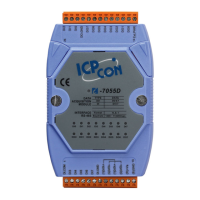
I-7055D 8 Channel Isolated DI (Counter)and 8 Channel Isolated DO DAQ Module- QuickStart (Feb/2016)
ICP DAS USA, Inc. | www.icpdas-usa.com | 1-310-517-9888 | 24309 Narbonne Ave. Suite 200. Lomita, CA 90717
1
I-7055D
8 Channel Isolated Digital Input (Counter)and
8 Channel Isolated Digital Output Data
Acquisition Module
Quick Start Guide
Product Website:
http://www.icpdas-usa.com/i_7055d.html
http://www.icpdas-usa.com/dcon_utility_pro.html
1. Introduction
I-7055D is intelligently designed to provide signal conditioning system
monitoring and safe value settings. I-7055D is a cost-effective solution for a
wide range of valuable industrial control signals and systems. The DCON
utility can help users to configure and test I-7055D digital Input modules.
Plenty of library functions and demo programs are provided to let users
develop programs easily under Windows, Linux and DOS operating
systems. The communication interface is modbus protocol via RS-485.
Users may mount the modules on a DIN rail, panel or wall. Modules have a
screw-terminal block to connect to the signals.
2. Terminal Assignment
Question and Answer IconNeed help?

Do you have a question about the ICP DAS USA I-7055D and is the answer not in the manual?

Overview

The I-7055D is an 8-channel isolated digital input (with counter functionality) and 8-channel isolated digital output data acquisition module, designed for signal conditioning, system monitoring, and safe value settings in industrial control applications. It offers a cost-effective solution for handling a wide range of industrial control signals and systems.

Function Description:

The I-7055D is intelligently designed to provide robust signal conditioning and monitoring capabilities. It includes 8 isolated digital input channels, which also support counter functionality, and 8 isolated digital output channels. This dual functionality makes it versatile for various industrial automation tasks, from reading sensor states and counting events to controlling actuators and indicators. The module communicates via RS-485 using the Modbus protocol, ensuring compatibility with a broad range of industrial control systems and software.

Important Technical Specifications:

  • Channels: 8 isolated digital input channels (with counter) and 8 isolated digital output channels.
  • Isolation: The module features isolation for both digital inputs and outputs, which is crucial for protecting sensitive control systems from electrical noise and ground loops in harsh industrial environments.
  • Communication Interface: RS-485, supporting the Modbus protocol. This standard industrial communication protocol allows for easy integration into existing control networks.
  • Power Supply: The module operates on a DC voltage supply ranging from +10V to +30V. This wide input range provides flexibility for various power sources commonly found in industrial settings.
  • Default Settings:
    • Module Address: 01
    • DIO Type: Type 40
    • Baud Rate: 9600 bps
    • Checksum: Disabled
    • J3: Set to INIT mode enabled (This jumper setting is likely used for initial configuration or resetting the module to its default state).
  • Mounting Options: The module can be mounted on a DIN rail, panel, or wall, offering flexible installation options to suit different enclosure and space requirements.
  • Connectivity: Features screw-terminal blocks for easy and secure connection of signals, which is a common and reliable method for industrial wiring.

Usage Features:

  • Easy Configuration and Testing: The DCON utility pro software is provided to help users configure and test the I-7055D digital input modules. This utility simplifies the setup process, allowing users to set parameters such as module address, baud rate, protocol, and checksum.
  • Software Support: ICP DAS provides a wealth of library functions and demo programs, enabling users to develop custom applications easily across various operating systems, including Windows, Linux, and DOS. This extensive software support reduces development time and effort.
  • Modbus Protocol: The use of Modbus protocol over RS-485 ensures broad compatibility with existing industrial control systems, PLCs, HMIs, and SCADA software.
  • Terminal Command Interface: For I-7000 modules, the DCON utility pro terminal allows users to send direct commands to the module. This feature is useful for advanced configuration, diagnostics, and debugging. Users can select specific commands (e.g., for reading input channels or writing to output bits) directly from the utility, which can be particularly helpful when the exact command syntax is unknown.
  • Flexible Wiring Diagrams: The manual provides clear block and wiring diagrams for both dry and wet contact inputs, as well as output configurations for driving relays and resistive loads. This visual guidance assists in correct installation and troubleshooting.
  • LED Indicators: The module likely includes LED indicators for status and output states (e.g., "ON State LED ON" and "OFF State LED OFF" for outputs), providing immediate visual feedback on the module's operation.

Maintenance Features:

  • Robust Design: The I-7055D is designed for industrial environments, implying a robust construction capable of withstanding typical industrial conditions.
  • Screw-Terminal Blocks: The use of screw-terminal blocks facilitates easy and reliable wiring connections, which are also simple to inspect and maintain.
  • DCON Utility for Diagnostics: The DCON utility pro serves as a powerful diagnostic tool. It allows users to search for modules, configure settings, and send commands to test module functionality, aiding in troubleshooting and maintenance. The utility's ability to display refer commands simplifies the process of testing and debugging modules, even for users unfamiliar with specific command sets.
  • Firmware Updates (Implied): While not explicitly detailed as a maintenance feature, the presence of a "Firmware" section in the DCON utility interface suggests that firmware updates might be possible, allowing for future enhancements or bug fixes.
  • INIT Mode: The J3 jumper for INIT mode provides a way to reset the module to its default settings, which can be a useful troubleshooting step if configuration issues arise.

ICP DAS USA I-7055D Specifications

General IconGeneral
BrandICP DAS USA
ModelI-7055D
CategoryControl Unit
LanguageEnglish

Related product manuals