https://www.icstation.com/
Email:orders@icstation.com ; Icstation.com@outlook.com
1
TJ-56-513B Heart Shaped Rotating Led 4Bit Digital Electronic Clock DIY Kit
1.Introduction:
TJ-56-513B is a Heart Shaped Rotating Led 4Bit Digital Electronic Clock
DIY Kit. It will display current date, time, temperature in the real time, hourly
reminder, alarm clock music and led animation. User can set alarm as your
needs.It is easy to operate, beautiful design, very suitable for home or office
environment.
2.Feature:
1>.Exquisite design
2>.Red-Blue led flashing display
3>.Red 4 Bit Digital display
4>.Automatic brightness adjustment
5>.Time/Date/Alarm/Temperature
6>.Adjustable alarm clock music/LED animation modes
7>.Time memory function
8>.Temperature value can be calibrated
9>.Hourly Reminder
10>.DIY manual soldering
3.Parameter:
1>.Item name: TJ-56-513B Heart Shaped Rotating Led 4Bit Digital
Electronic Clock DIY Kit
2>.Model:TJ-56-513B
3>.Work voltage:DC 5V
4>.Display color:Red
5>.Work Temperature:-20
℃
~85
℃
6>.Work Humidity:0%~95%RH
7>.Size(Installed):100*90*13mm
4.Main Function:
1>.Display time: Hour, Minute, Second.
2>.Display date: Year, Month, Day.
3>.Display Week.
4>.Display current temperature in Celsius.
5>.Adjustable alarm clock music: 4 music.
6>.Hourly Reminder
7>.Automatic brightness adjustment.
8>.Adjustable volume.
9>.Set LED display mode.
10>.Calibration temperature display value.
5.Set Method:
1>.It displays the current time by default in hour-minute.

 Need help?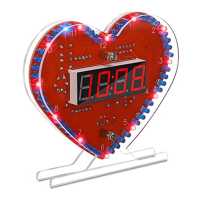

 To Next Page
 General