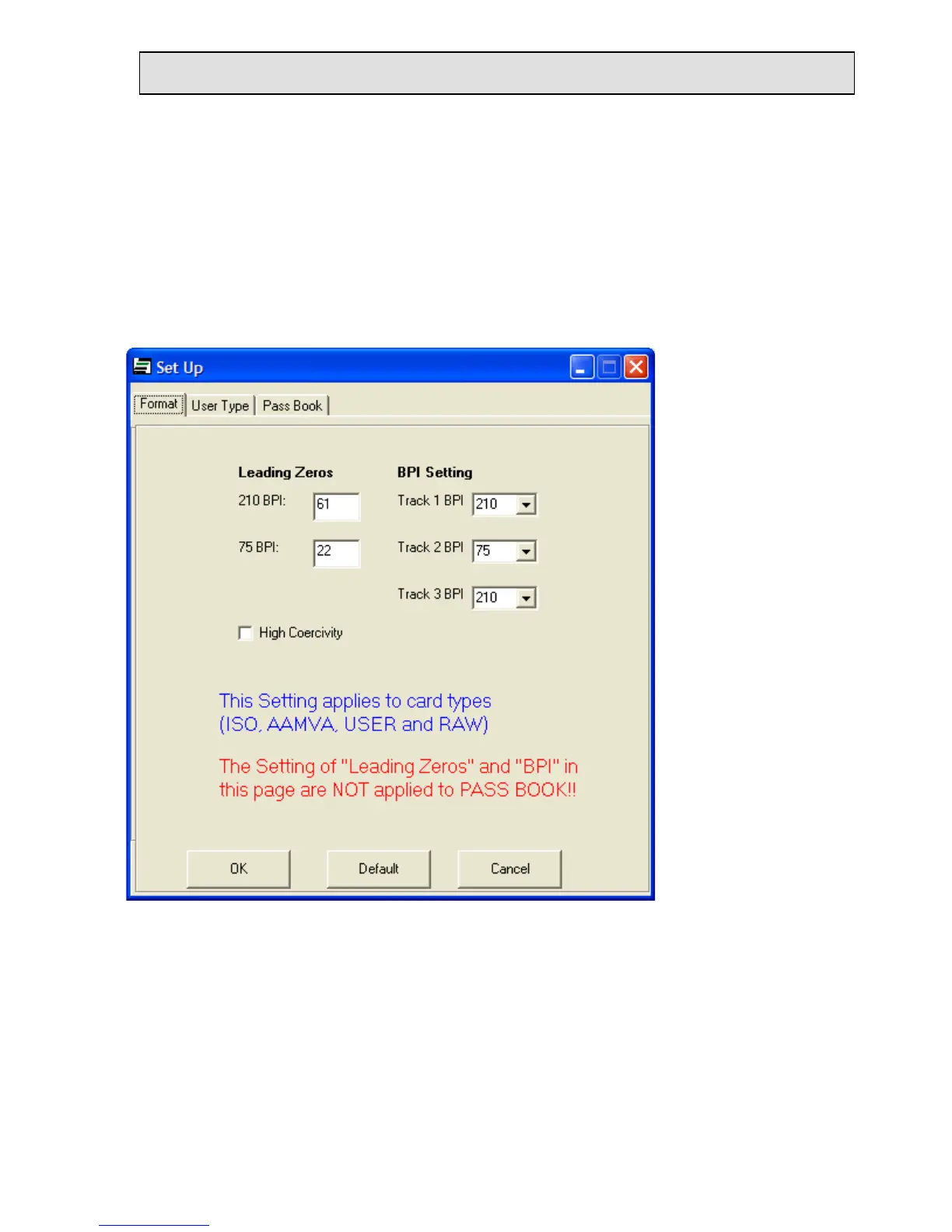
The WorkShop default setting is for Lo-Co magnetic stripe cards. For Hi-Co magnetic
stripe cards, click the “Setup” button in the lower right corner of the WorkShop window.
Then click the High Coercivity check box. See the example with the Hi-Co box checked.
Do not change any other selection. Click OK to return to the WorkShop window.
There are two sample cards provided with the EzWriter. One is a Lo-Co type and the other
is a Hi-Co type. Either one or the other can be used. The coercivity in the Setup window
must be set to match the card type used. Note: the EconoWriter product supports only low
coercivity card writing; selecting the High Coercivity check box does not affect EconoWriter.
Click the Write button. The “Write Card” window appears as shown on the previous page.
Caution: When the “Please Swipe a Card” window has a yellow background color and
when a card is swiped through the slot, the EzWriter changes data on the magnetic stripe.
When there is no data in a Track text box, then that specific track is not written and any
data already on that track is not changed or erased.


 To Next Page