EasyManua.ls Logo

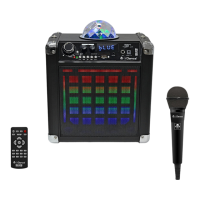
iDance DISCO CUBE BC-20 User Manual

iDance DISCO CUBE BC-20
25 pages
To Next Page IconTo Next Page
Page #1 background imageLoading...
Page #1 background image
PLEASE READ THIS USER MANUAL COMPLETELY BEFORE OPERATION THIS UNIT AND RETAIN THIS BOOKLET FOR FUTURE REFERENCE
ENGLISH
FRANÇAIS
NEDERLANDS
DEUTSCH
ESPAÑOL
ITALIANO
....EN1-EN4
....FR1-FR4
....D1-D4
....DE1-DE4
....ES1-ES4
....IT1-IT4
This product meets the essential requirements of Directive 1999/5/EC.
http://www.idanceaudio.com/documentation/declarationofconformity/bc20/
WORLD
HEADQUARTERS:
iDance H.K.
Unit i, 6/F., MG Tower,
133 Hoi Bun Road, Kwun Tong,
Kowloon, Hong Kong.
UK OFFICE:
iDance Audio U.K.
Graham Lloyd Building, Midland
Structures Industrial Estate
Ampthill Road, Bedford MK42 9JJ,
United Kingdom
EUROPE OFFICE:
iDance Audio Europe
Gaasterland 2c
1948RG Beverwijk
The Netherlands
DISCO CUBE
BLUETOOTH KARAOKE System with Built-in Light Show
Systeme Karaoke Bluetooth avec jeux de lumieres inclus
BC-20
Question and Answer IconNeed help?

Do you have a question about the iDance DISCO CUBE BC-20 and is the answer not in the manual?

iDance DISCO CUBE BC-20 Specifications

General IconGeneral
BrandiDance
ModelDISCO CUBE BC-20
CategoryKaraoke System
LanguageEnglish

Summary

General Safety and Precautions

Warnings and Symbols Explained

Details safety warnings regarding fire, shock, and explains equipment symbols for user safety.

Essential Safety Instructions

Provides a comprehensive list of critical safety guidelines for operating the apparatus.

Speaker Charging and Panel Functions

Speaker Battery Charging Guide

Instructions on how to charge the speaker's battery, including time and best practices.

Rear Panel Control Identification

Identifies and describes the purpose of each control and port located on the rear panel.

Remote Control and Bluetooth Connectivity

Remote Control Operation

Explains the functions and usage of each button on the provided remote control.

Bluetooth Device Pairing

Step-by-step instructions for connecting a smartphone or other device via Bluetooth.

Media Input and Lighting Features

USB and SD Card Playback

Guide to inserting and playing audio files from USB drives and SD cards.

AUX Audio Input

Instructions for connecting external audio sources using the AUX input port.

LED Lighting Feature

How to activate and control the unit's colorful LED lighting effects.

Related product manuals