EasyManua.ls Logo

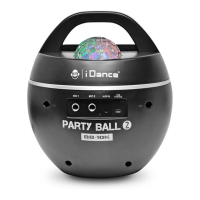
iDance PARTY BALL 2 - User Manual

iDance PARTY BALL 2
26 pages
Print Icon
To Next Page IconTo Next Page
Loading...
PLEASE READ THIS USER MANUAL COMPLETELY BEFORE OPERATION THIS UNIT AND RETAIN THIS BOOKLET FOR FUTURE REFERENCE
ENGLISH
FRANÇAIS
NEDERLANDS
DEUTSCH
ESPAÑOL
ITALIANO
....EN1-EN4
....FR1-FR4
....D1-D4
....DE1-DE4
....ES1-ES4
....IT1-IT4
PARTY BALL
BLUETOOTH KARAOKE System with Built-in Light Show
Systeme Karaoke Bluetooth avec jeux de lumieres inclus
BB-10K
2

Questions and Answers

  • B
    Brandon BakerAug 5, 2025
    What to do if there is no sound on my iDance PARTY BALL 2?
    • M
      Meagan WagnerAug 5, 2025
      If you're not getting any sound from your iDance Karaoke System BB10K, there are several things you can check: * First, make sure that the BB10K is powered ON. * Check the volume level on the external device you're using. * Also, verify the volume level on your paired Bluetooth device. * If the battery is low, connect the USB cable and charge it.
  • A
    Audrey GonzalezAug 13, 2025
    How to fix iDance PARTY BALL 2 BB10K Bluetooth connection issues?
    • L
      ljimenezAug 13, 2025
      If you're having trouble connecting to your iDance Karaoke System BB10K via Bluetooth, ensure that no other devices are currently connected to it. The Bluetooth button should stay ON when connected, indicating that Bluetooth is ready to connect. Also, make sure your smartphone or tablet is within 2 meters of the BB10K during pairing. If issues persist, hold the BLUETOOTH button to reconnect.
  • G
    George DeanAug 25, 2025
    Why does my iDance PARTY BALL 2 have intermittent Bluetooth music streaming?
    • S
      scott94Aug 26, 2025
      Intermittent Bluetooth music streaming on your iDance Karaoke System BB10K can occur due to several reasons. The wireless Bluetooth range is about 7-10 meters in an open area. Bluetooth signal could be blocked by: * Metal protection on your phone or tablet case. * Metal or wall obstructions between your phone/tablet and the BB10K. * Another Bluetooth device operating nearby.

Summary

Safety and Warnings

General Safety Precautions

Covers warnings about fire, shock, moisture, and proper product usage.

Equipment Symbols and Notes

Explains the Class II symbol and provides notes on interference and servicing.

Product Features

Key Features Overview

Highlights Bluetooth streaming, microphone inputs, and lighting effects.

Control Location

Top View Controls

Identifies controls and ports on the top of the device.

Rear View Controls

Identifies controls and ports on the rear of the device.

Control Details

Device Controls and Indicators

Detailed explanations for all buttons, ports, and LED indicators.

General Operations

Power and Charging Instructions

Guidance on connecting to power, charging the battery, and battery safety.

Connecting Bluetooth

Bluetooth Pairing and Music Playback

Steps to connect a Bluetooth device and stream music wirelessly.

Troubleshooting

Common Issues and Solutions

Provides solutions for connectivity and audio playback problems.

Specifications

Technical Specifications

Lists technical details such as power, battery, and audio output.

iDance PARTY BALL 2 Specifications

General IconGeneral
Product TypeKaraoke System
ModelPARTY BALL 2
BrandiDance
ConnectivityBluetooth
Microphone Inputs2
Built-in SpeakersYes
DisplayNo
MicrophoneIncluded

Related product manuals