PageSNAP Test Quick Reference Guide Return to table of contents 6
SNAP
®
Heartworm RT Test
Test procedure*
25°C
2°C
Screen annually for heartworm.
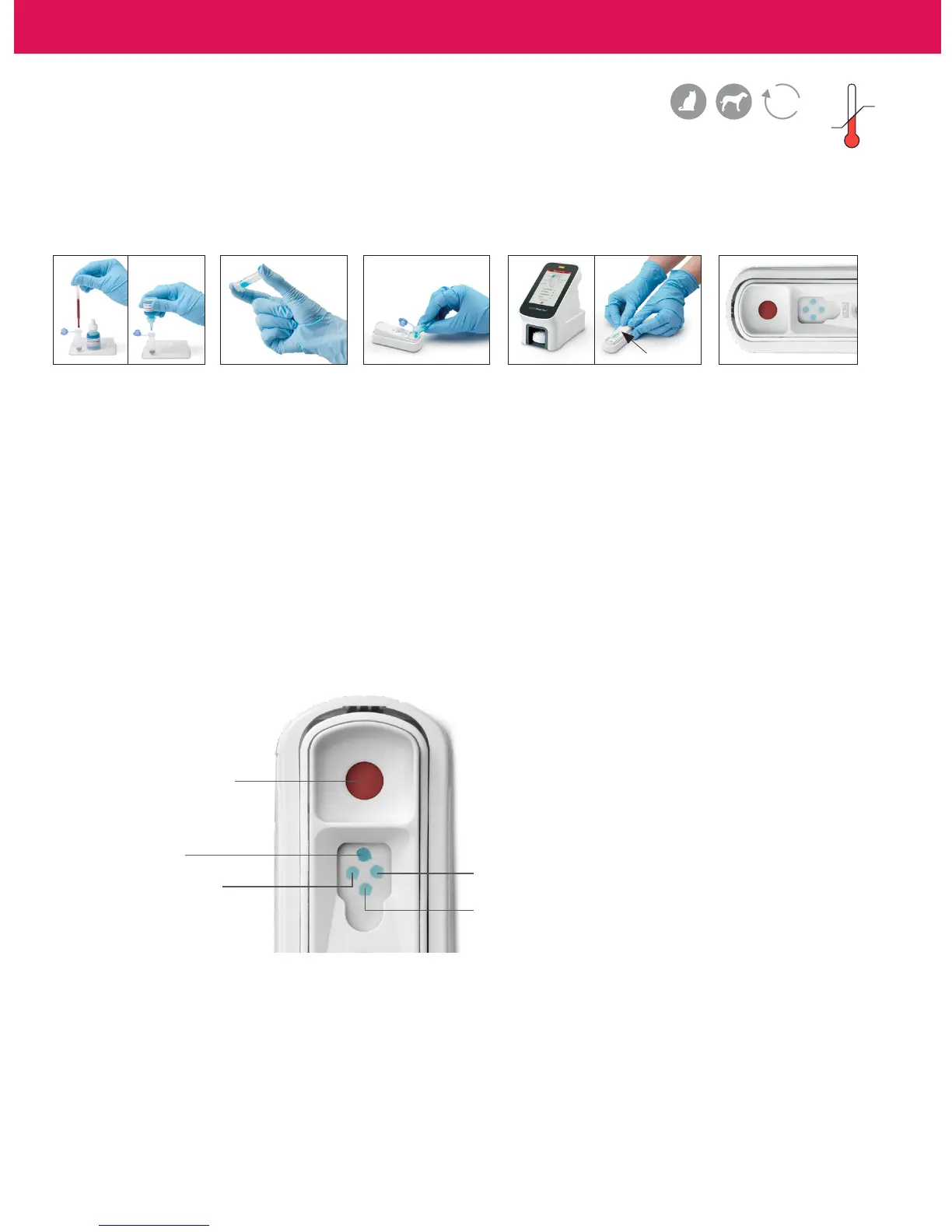
1. Using the provided
pipette, dispense
3 drops of sample
and 4 drops of
conjugate to the
sample tube.
2. Gently invert 3–5
times to mix.
3. Pour the entire
contents of the
sample tube
into the sample
well of a SNAP
Heartworm RT
device.
5. Read the result at
8 minutes.
Activation
circle
4. Use the SNAP Pro
®
Analyzer
to automatically activate the
SNAP test and interpret the
result.
OR
When color first appears in
the activation circle, press
firmly to activate. You will
hear a distinct “snap.”
8
min
Positive control
High antigen indicator
Negative control
Whole blood
†
, serum,
or plasma sample
For more information or to order this test, visit idexx.com/heartworm.
Low antigen indicator
*Before beginning any test, refer to the package insert for complete instructions.
†Anticoagulated whole blood (e.g., EDTA, heparin)


 To Next Page