5
Installation
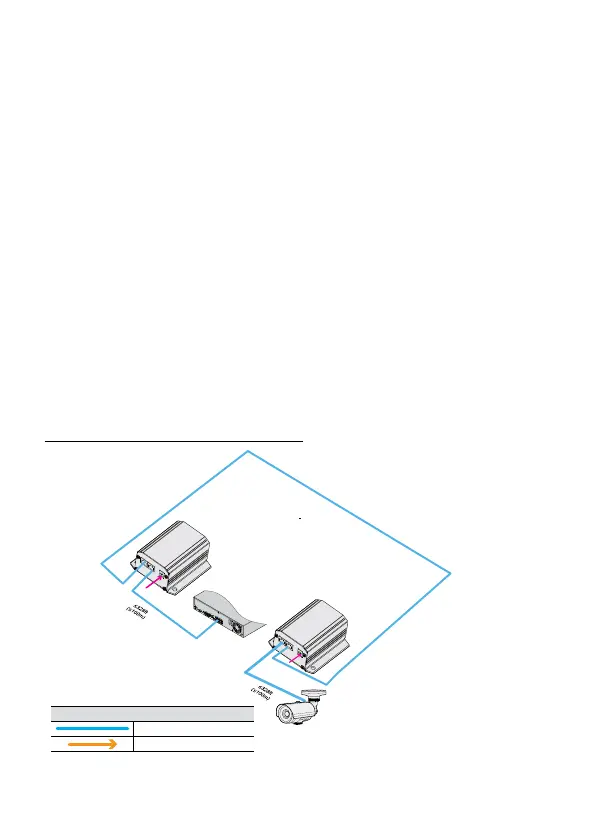
<In Case of Using Long Reach PoE Function>
1
Connect Video In or Ext port of DirectIP™ NVR and PoE In of DA-LP1101R using a
network cable.
2
Connect LRP Out port of DA-LP1101R and LRP In port of DA-LP1101T using a network
cable.
3
Connect PoE Out port of DA-LP1101T and network port of DirectIP™ Camera using a
network cable.
4
In case NVR has no PoE function or lacks of power, connect the adapter to DA-LP1101R
or DA-LP1101T. (Purchase an adapter separately)
5
When DA-LP1101R and DA-LP1101T turns on, Power LED lights up. Also when the
communication is initiated, L/A LED blinks.
DA-LP1101R / DA-LP101T Installation Layout
DA-LP1101R
LRP OUT
POE IN
L/A PoE L/A PoE
48~56V DC
DA-LP1101T
LRP OUT
LRP IN
L/A PoE L/A PWR
48~56V DC
<1,640 ft (500m)
DirectIP™ NVR
Types of Cables
UTP Cable (DATA + Power)
DC Power



 To Next Page