3. Preparation and operation
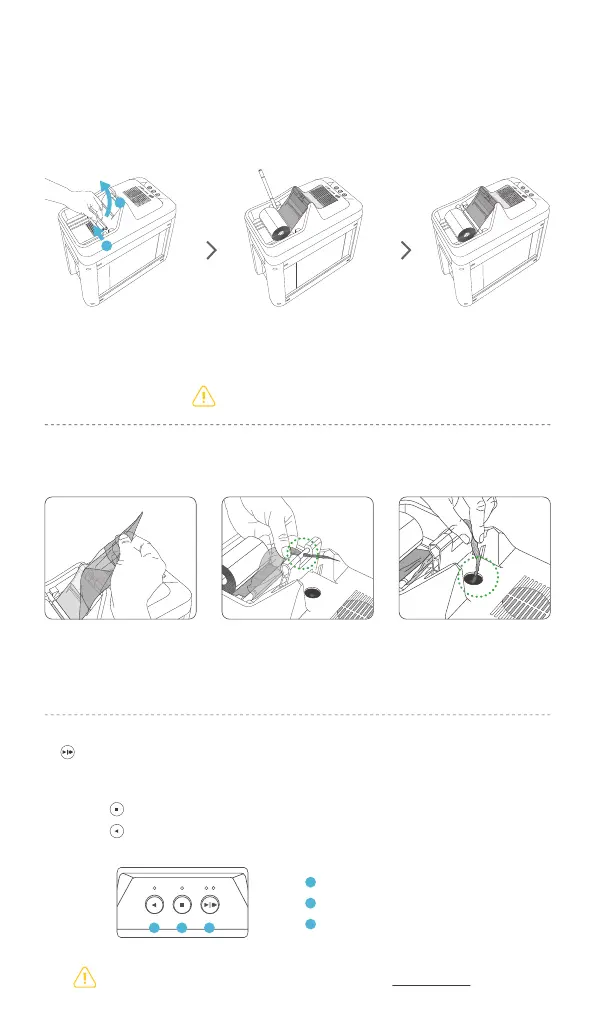
To prepare the ribbon for shredding, lift the Ribbon Guide, place the ribbon in the
Ribbon Tray, then lower Ribbon Guide into position.
Carefully follow steps pictured below to insert ribbon into the Shredding Gate.
●
Two operating speeds, normal and fast, are available.
The LED blinks if an error occurs. Please refer to Section 5. Maintenance for details.
Lower
Ribbon guide.
Place the end of the ribbon
face down as a pictured.
Be careful to install ribbon as pictured.
Fold the end of the
ribbon to make a point.
Insert the point of the ribbon
through the Ribbon Hole
Guide.
Insert the point of the ribbon
into the Shredding Hole.
Push the ‘Shred’ button to operate.
●
Push ‘Stop’ button to stop it.
●
Push ‘Reverse’ button to detach a remained ribbon or a jammed ribbon.
Shred
(Normal | Fast)
1
Stop
2
Reverse
3
3 2 1
Lift up
Ribbon Guide.
1
2


 To Next Page