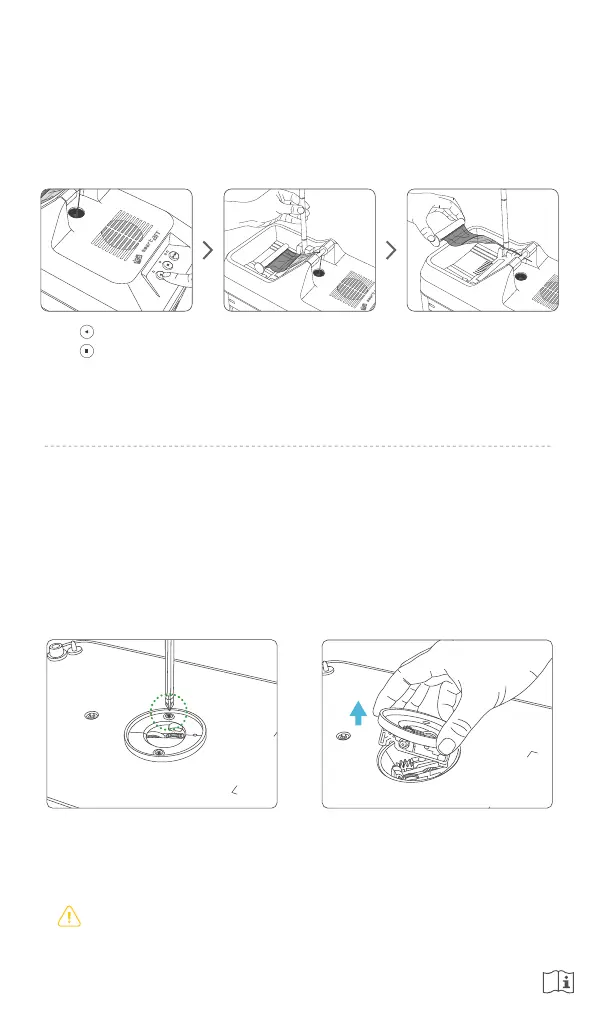
4. Detach / Remove Ribbon
When shredding is complete, SMART-BIT will stop automatically and the LED blink.
The ribbon to be shredded can be detached and removed using the following steps.
Lift up the Ribbon Guide. Take out the ribbon core
and dispose of as
recommended by the
printer manufacturer.
Push ‘Reverse’ button
Push ‘Stop’ button to
detach a ribbon from the
Shredding Gate.
Disassemble the cutter module of SMART-BIT as following steps.
●
Disassembly of the cutter module
Remove two screws in the cutter module
by a (+) screwdriver as a picture.
Disassemble the cutter module
to lift up as a picture.
●
Disconnect and unplug the power adapter before disassembling a cutter module.
Otherwise, it may cause injury or damage.
5. Maintenance


 To Next Page