User Manual
Page 7
ID station User Manual
The software will process the sample photo into a perfectly aligned passport photo for
“USA Passport”, the selected country template. After the automatic processing the
software will check if the passport photo complies to the requirements for a USA
passport photo. The results are shown as green or red boxes.
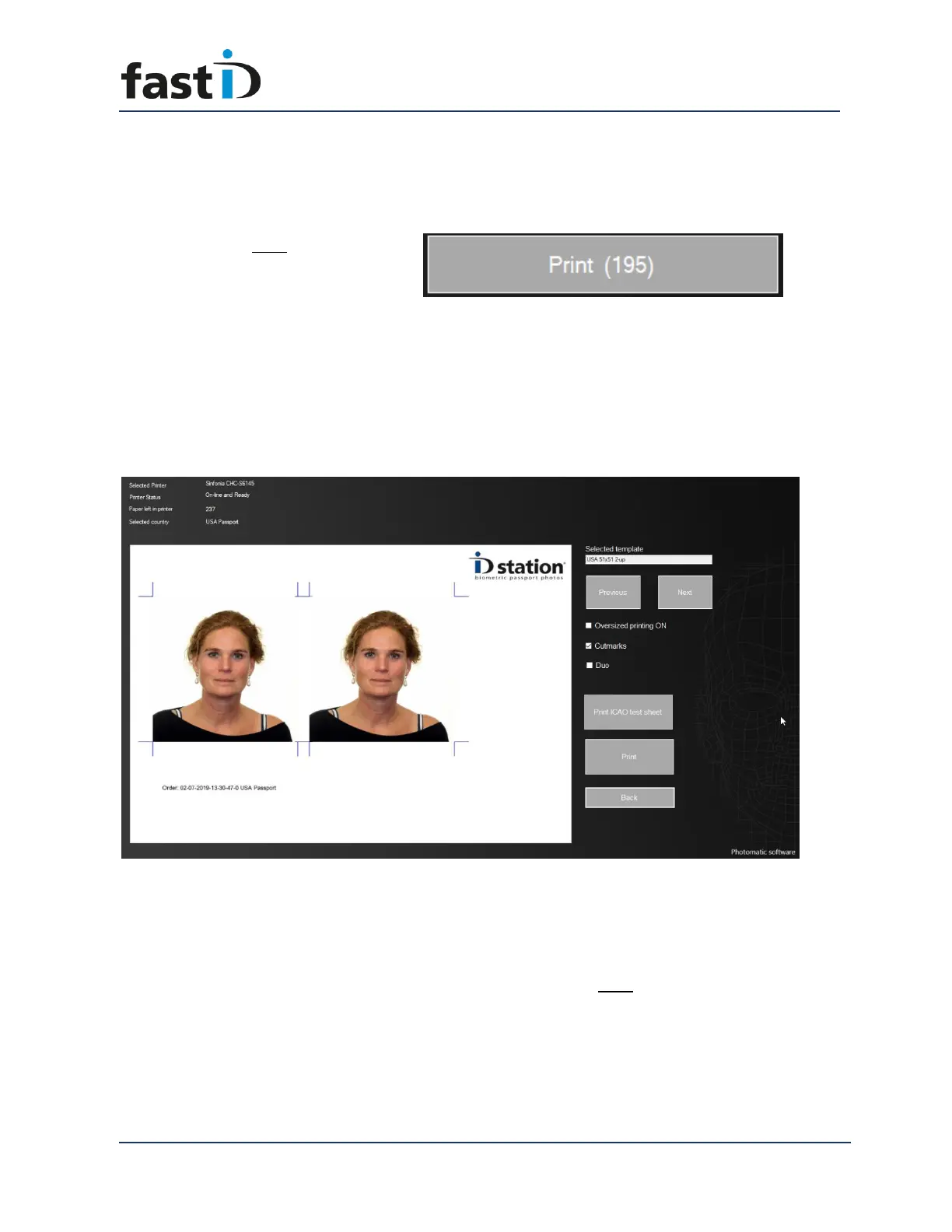
Now click on the Print button:
The (195) behind the Print indicates the remaining number of prints. Probably you will
see 300 as you’ve just loaded a new ribbon and roll of paper into the printer. Now after
you’ve clicked on the Print button the passport photos aren’t printed immediately. You
will first see the Print Preview:
The Print Preview window not only shows you a preview of what will be printed when
you hit the Print button, it also contains information about the printer and the options
you can select or deselect.
You may also select another Print template”. For now, just click Print and the passport
photos will be ready in about 10 seconds.
You have setup your new fastID and printed your first set of passport photos with it.
Now it’s time to start taking pictures.


 To Next Page