
 Need help?
Do you have a question about the ifi ZEN STREAM and is the answer not in the manual?
Explains the function of the power switch and its indicator light.
Details the LED color scheme indicating signal strength and network status.
Explains the LED color scheme for audio format and sampling frequency.
Describes the LED indications for hotspot connection status and awaiting connection.
Outlines the functions of the LED/Hotspot switch via short and long presses.
Lists the five selectable play modes for system configuration.
Describes the USB Type A ports, compatibility, and ANC technology.
Specifies the DC power input voltage range and connection advice.
Details the steps for setting up the ZEN Stream via Ethernet.
Instructions for using the TIDAL app for music streaming.
Guide for connecting the ZEN Stream to a Wi-Fi network.
Connects to the Wi-Fi antenna for wireless network input.
Provides a coaxial SPDIF digital audio output.
USB port for outputting audio data to a DAC.
USB port for connecting external storage devices.
Ethernet port for a wired connection to a router.
DC power input port for supplying electricity to the device.
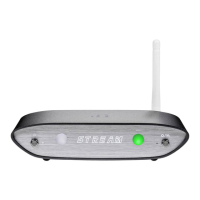
The iFi ZEN Stream is a Wi-Fi Audio Transport designed to enhance your audio streaming experience. It acts as a bridge between your music source and your audio system, ensuring high-quality sound transmission.
The ZEN Stream is primarily a Wi-Fi audio transport, meaning it receives audio signals wirelessly and outputs them to your audio system, typically a Digital-to-Analog Converter (DAC). It supports various streaming modes and audio formats, aiming to deliver a pure and uncompromised audio signal.
The device offers a range of features for flexible and high-quality audio streaming:
Power and Network Status Indicators: The device includes a power switch and an indicator light. The Network Status LED (labeled as "8") uses a color scheme to indicate the signal strength and network status received from your router. White signifies a fast internet connection, cyan indicates a slow internet connection, green means a fast local network (no internet), yellow denotes a slow local network (no internet), and red indicates no connection.
Audio Format LED: An Audio Format LED (labeled as "kHz") visually communicates the audio format and sampling frequency being received from your music source. Different colors correspond to various modes: green for PCM 44.1/48/88.2/96kHz, yellow for PCM 176.4/192/352.8/384kHz, cyan for DSD 64/128, blue for DSD 256, and off when no streaming is active.
Hotspot Status LED: A dedicated LED indicates the hotspot status. A flashing light means the hotspot is on and awaiting connection, a solid ON light signifies a connected hotspot, and OFF indicates the hotspot is off. The hotspot automatically turns off after 60 seconds if there's no activation.
LED/HOTSPOT Switch: A multi-function switch allows you to control the LEDs and hotspot. A short press toggles the LEDs ON/OFF, while a long press toggles the hotspot ON/OFF.
Antenna: The device comes with an antenna that should be attached for maximum reception quality, ensuring a stable wireless connection.
System (Mode) Selector: A selector switch allows you to choose from five distinct play modes, optimizing the device for specific usage scenarios:
SPDIF (Coaxial) Output: The ZEN Stream features a coaxial output with built-in iPurifier technology, designed to deliver a clean and high-fidelity digital audio signal.
USB Type A Ports (x2): Two USB Type A ports are provided, compatible with both USB 2.0 and USB 3.0. These ports serve dual functions:
Ethernet Port: For a stable and direct connection, an Ethernet port allows you to connect the ZEN Stream directly to your router.
DC Power Supply Connection: The device requires a DC power input, and you should connect it to the enclosed power supply.
Quick-Start Guide: The manual provides a clear quick-start guide for both Ethernet and Wi-Fi setups.
Music Streaming Compatibility: The ZEN Stream supports a wide range of music streaming services and DLNA clients, including TIDAL, Spotify, Qobuz, YouTube Music, QQ Music, JRiver Media Center, Audirvana, foobar2000, Signalyst HQPlayer, VLC media player, nPlayer, Mconnect, and MediaMonkey, offering extensive compatibility for your audio ecosystem.
The ZEN Stream includes features designed for easy maintenance and updates:
System Upgrade Port: A dedicated port is available for system firmware upgrades, ensuring your device can stay up-to-date with the latest features and improvements.
Factory Reset: The device offers two types of reset functions:
 General
| Input | USB |
|---|---|
| Outputs | USB-A x 2/ S/PDIF (coaxial)/ RCA |
| Wi-Fi | 802.11a/b/g/n/ac |
| Supported Formats | PCM up to 384kHz DSD up to DSD256 |
| Dimensions | 158 x 100 x 35 mm |
| Ethernet | Gigabit LAN |

 To Next Page
