The EZ-√Check Digital Height Gauge is a precision measuring instrument designed for accurately setting and measuring heights in various woodworking and machining applications. Its primary function is to provide precise digital readings of height, allowing users to achieve exact adjustments for tools like router bits, table saw blades, and dado sets. The device features a DRO (Digital Readout) unit mounted on an arm, which extends from a stable base. The DRO unit displays measurements digitally, offering convenience and accuracy over traditional analog methods.
Function Description
The core function of the EZ-√Check is to measure vertical distances from a reference surface. This is achieved by placing the device's base and foot on a flat surface, then extending or retracting the arm to contact the object being measured. The DRO unit then provides a digital readout of the height. The device is particularly useful for setting the height of cutting tools, such as router bits and table saw blades, ensuring consistent and accurate cuts. It can also be used to measure the distance from a fence to a bit or blade, which is crucial for precise material removal. The inclusion of centerline offsets (Ø1/2", Ø3/8", Ø1/4") and a 0.25" offset on the foot allows for versatile measurement configurations, accommodating different bit sizes and measurement requirements.
Usage Features
The EZ-√Check is designed for ease of use with several intuitive features:
- DRO Unit with Digital Display: The central component for measurement, providing clear, easy-to-read digital values. The display can show measurements in fractional inches, decimal inches, or metric units, offering flexibility for different user preferences and project requirements.
- Three-Button Interface: The DRO unit features three distinct buttons for control:
- On/Zero Switch: A short push turns the display on. A second push zeros the numeric display, allowing the user to set a new reference point for relative measurements. The display automatically turns off after a few minutes of inactivity to conserve power.
- Hold Button: This button allows the user to "freeze" the current display reading. This is particularly useful when taking measurements in awkward positions or when the user needs to move the device to read the display more clearly. Pushing the button again returns the display to normal, live reading.
- Mode Switch: Each push of this button cycles through the available display modes: fractional inch, decimal inch, and metric. This enables users to quickly switch between units without complex menu navigation.
- Mode Indicator: An indicator on the DRO unit clearly shows the current measurement mode (e.g., "in" for inches).
- Locking Screw: This feature allows the user to lock the arm in a specific position, which can be helpful for maintaining a set height or for transferring a measurement.
- Centerline Offsets: The device includes specific offsets (Ø1/2", Ø3/8", Ø1/4") and a 0.25" offset on the foot. These are critical for accurately measuring to the centerline of various router bits or for measuring from the inside or outside of a cutter. For example, when measuring to the centerline of a 1/4", 3/8", or 1/2" straight bit, the appropriate centerline offset can be used against the cutter. For other bits, the bit can be raised, and the measurement taken against the 1/4" or 1/2" shank with the corresponding offset.
- Magnetic Base: The base of the EZ-√Check is equipped with magnets. These magnets help to securely hold the device in place on ferrous surfaces, such as cast iron tabletops of table saws or router tables, ensuring stability during measurement and preventing accidental movement.
- Versatile Applications: The EZ-√Check is designed for a range of applications, including:
- Router Table Bit Height Adjustment: Users can set up the device with the foot over the router bit and hold down the base while raising the bit to the desired height.
- Router Table Fence-to-Bit Distance: The device can be laid on its backside on the tabletop with the base against the fence to measure the distance to the bit. This involves using the centerline offsets for accurate measurements to the bit's center, outside, or inside.
- Table Saw Blade/Dado Set Height Adjustment: Similar to router table applications, the device can be used to adjust the height of table saw blades or dado sets. The magnetic base is particularly useful here for stability on cast iron surfaces.
- Table Saw Fence-to-Blade Distance: The device can also measure the distance from the fence to the blade, similar to the router table inside-of-the-bit measurement.
- Pre-Measurement Setup: Before taking any measurement, users are instructed to place the base and foot on a flat surface, turn on the display, select the desired display mode, and then zero the display. This ensures a consistent and accurate starting point for all measurements.
Maintenance Features
The manual does not explicitly detail maintenance features, but general best practices for precision instruments apply:
- Careful Handling: As a precision instrument, the EZ-√Check should be handled with care to avoid drops or impacts that could affect its accuracy or functionality.
- Cleanliness: Keeping the device clean, especially the measuring surfaces and the display, is important for accurate readings and clear visibility. Dust and debris can interfere with measurements or obscure the display.
- Storage: Storing the device in a clean, dry environment, away from extreme temperatures or humidity, will help preserve its longevity and accuracy.
- Battery Replacement: While not explicitly mentioned, digital devices typically require battery replacement. Users should refer to the device's design for instructions on how to access and replace the battery when the display indicates low power or fails to turn on.
- Safety First: The manual emphasizes safety by advising users to "Unplug power tools before performing these operations." This is a crucial maintenance and usage guideline, ensuring user safety during setup and measurement tasks involving power tools.

 Need help?
 General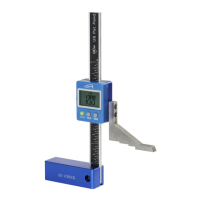

 To Next Page