4
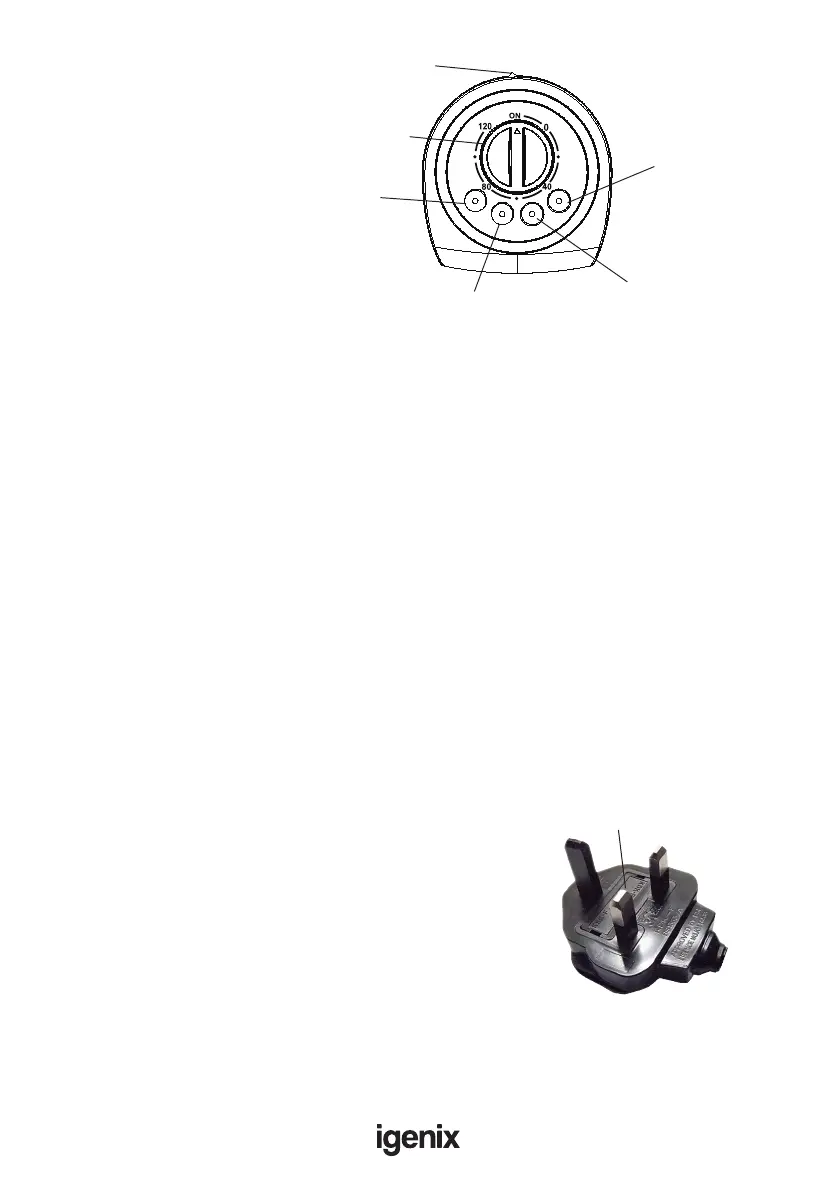
CONTROL PANEL
1. Oscillation switch
2. Timer dial
3. Off button = Power off
4. 1 Button = Low speed
5. 2 Button = Medium speed
6. 3 Button = High speed
OPERATING INSTRUCTIONS
1. Plug the power cord into a power socket.
2. To set the Timer, turn the timer control dial clockwise to the required time.
3. To end the timer setting early, turn the dial to the ‘ON’ position. Please note that may still be a
mechanical ticking noise until the timer has fully unwound.
4. To control the speed of the fan press required button:
• 1 button = Low Speed
• 2 button = Medium Speed
• 3 button = High Speed
5. To activate the oscillation function, press the OSCL switch, to deactivate the oscillation function press
the OSCL switch again.
CLEANING AND MAINTENANCE
1. Turn off the fan and remove the plug from the power socket before cleaning.
2. Use a dry soft cloth to remove any dust from the fan.
3. If the fan is particularly dirty use a soft damp cloth and wipe dry.
4. Do not use any chemicals or detergents as they will damage the fan.
5. Store the fan in a ventilated and dry area.
6. Do not allow water to get inside the body of the fan.
OFF
OSCL
1
2
3
1.
2.
3.
4.
5.
6.
Fuse Replacement (Class II)
Remove the fuse cover with a small at head screw driver.
Take out the fuse and replace with a new fuse of the same
Amp. Replace the fuse cover and push back into place.
Fuse Cover
MAINS PLUG FUSE REPLACEMENT


 To Next Page