14
TROUBLESHOOTING
If you are having problems with your appliance, please use our troubleshooting guide below. If you are
unable to resolve the issue using this guide please ring our Customer Service Department on 0844 848
5861. Please have the model code and purchase information available.
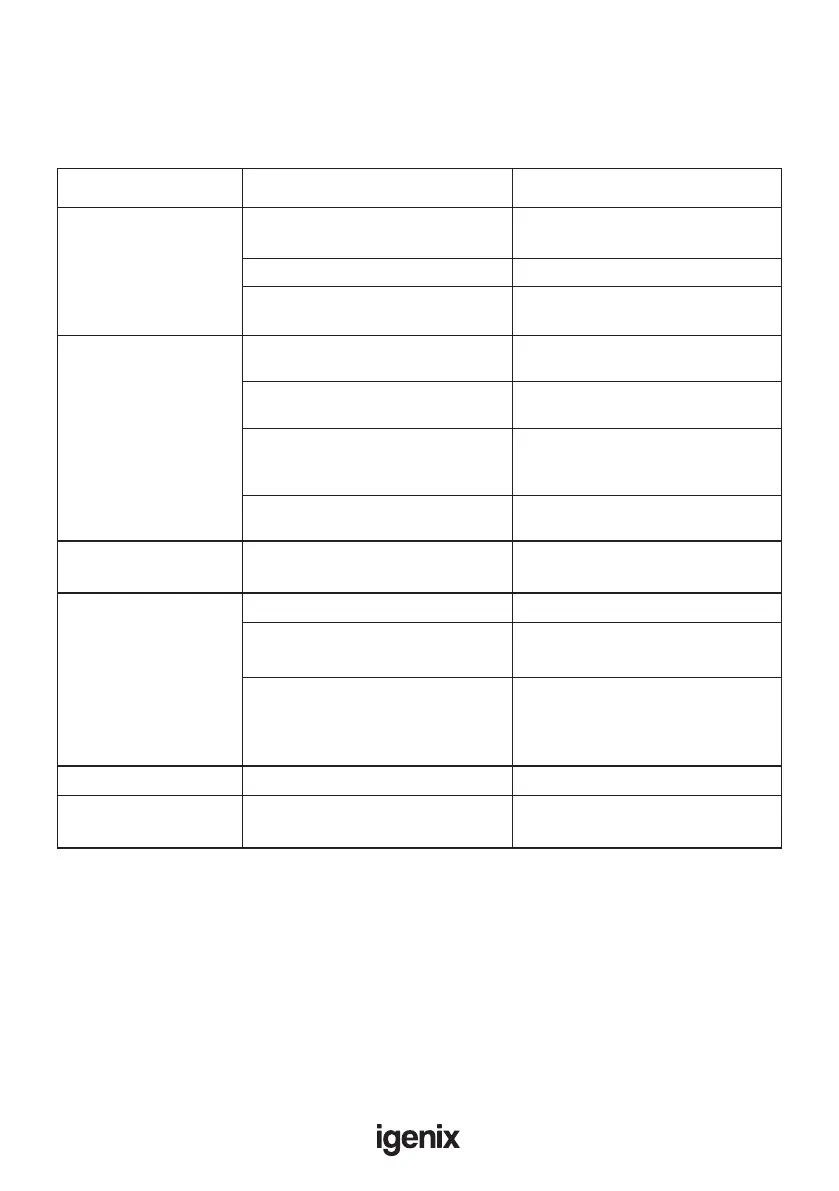
Appliance does
not work
Mains plug is not plugged in
or is loose
Insert mains plug.
Fuse has blown or is defective Check fuse, replace if necessary.
Socket is defective Mains malfunctions are to be
corrected by an electrician.
Temperature is not properly
adjusted.
Door was open for an extended
period.
Open the door only as long as
necessary.
A large quantity of warm food was
placed in the appliance within the
last 24 hours.
Turn the temperature regulation to
a colder setting temporarily.
The appliance is near a heat
source.
Please look in the installation
location section.
Temperature is set too cold.
Turn the temperature regulation knob
to a warmer setting temporarily.
Appliance is not level. Re-adjust the feet.
The appliance is touching the
wall or other objects.
Move the appliance slightly.
Water drain hole is blocked. See the Cleaning and care section.
It’s normal. Heat exchange parts
are in the sides.
Use gloves to touch sides.
A component, e.g. a pipe, on the
rear of the appliance is touching
another part of the appliance or the
wall.
If necessary, carefully bend the
component out of the way.
Fault Possible cause Solution
The food is too warm.
Please look in the initial
Temperature setting section.
Appliance cools too
much
Unusual noises
Water on the oor
Side panels are hot.


 To Next Page