7
CLEANING & MAINTENANCE
The oven should be cleaned regularly and any food deposits removed to prevent an accumulation of
grease and to avoid unpleasant odours. Failure to maintain the oven in a clean condition could lead to
deterioration of the surface that could adversely affect the life of the appliance and possibly result in a
hazardoussituation.
1. Turn off the mini oven and remove the power plug from the wall socket before cleaning. Allow
to cool.
2. Do not immerse the mini oven or power supply in water or wash under the tap.
3. Remove the wire shelf and baking tray and wash in hot soapy water.
4. Clean the outside of the mini oven with a damp cloth or sponge.
5. Do not use any abrasive cleaners or sharp utensils to clean the mini oven as these may scratch
the surface and weaken it.
6. Dry all parts thoroughly before replacing inside the oven.
Your oven features a continuous clean coating that automatically cleans itself during normal operation.
Anyspatteringthatoccurswhilecookingandcomesintocontactwiththecontinuouscoatingisoxidized
while the oven is in operation. If desired, wipe the walls with a damp sponge, cloth or nylon scouring pad
and mild detergent.
Do not use steel wool scouring pads, abrasive cleaner or scratch the oven
surface with a metal utencil.
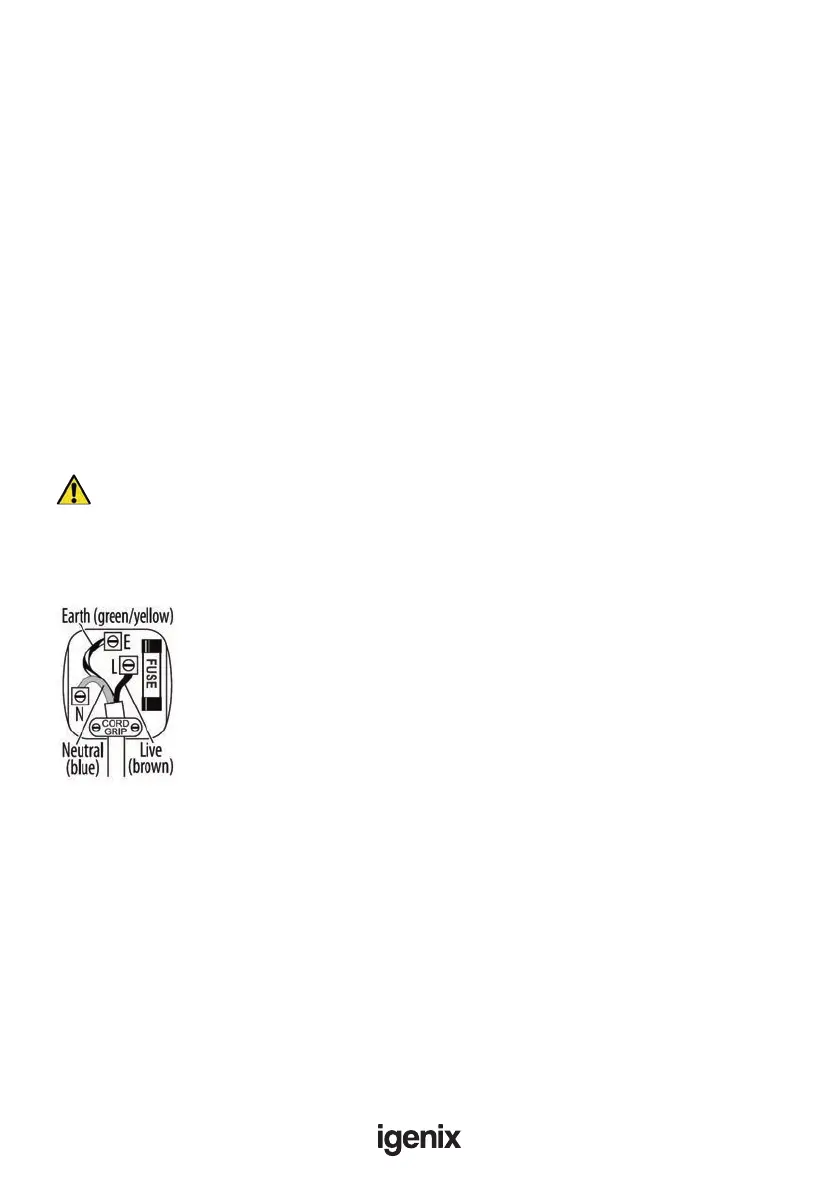
MAINS PLUG FUSE REPLACEMENT
Fuse Replacement (Class I)
This appliance must be earthed. Remove the central screw on the plug and
open the shell. Take out the fuse and replace with a new fuse of the same Amp.
Install the shell again and tighten the screws.


 To Next Page