EN
33
Instructions
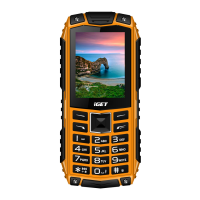
1. Left sof t key
2. Right soft key
3. Call / answer key
4. Call end, On / Off key
5. Main key
6. Navigation key to scroll up / down / right / left
7. Button with the star symbol – to lock / unlock the
phone
8. Button with the hash symbol – to activ ate the
silent mode
9. Button with the 0 symbol – to swich on / off the
torch
10. Camera
11. Torch
12. Cover for charging connector and powerbank
function
13. Micro-USB connector
14. Powerbank connector
15. Slots for mini SIM cards
16. Slot for memory card
17. Screws to open the rear cover. Unscrew these
screws to access the battery and SIM / memory
card
User manual:
Thank you for buy ing iGET product.
Individual technical parameters, the description of
the phone and the design may diff er depending on
the different versions of the phone and updates.
Precise specif ications and other information can be


 To Next Page