
 Need help?
Do you have a question about the Iget HGWOB-751 and is the answer not in the manual?
List of items included in the package, such as camera, adapter, and cables.
Details on internal storage capacity and durable casing.
Information on video quality and remote connectivity.
Ease of installation with adjustable mounting.
Instructions to download the Homeguardcare app from app stores.
Connecting the camera to the router and power source.
Ensuring the device is within the target Wi-Fi network range.
Steps to add a new camera and scan its QR code.
Inputting the default password for initial access.
Navigating through settings to configure Wi-Fi.
Choosing the network and providing the password.
Finalizing setup by removing Ethernet and placing the camera.
Advising to change the default password for security.
Revealing the menu action bar on the monitoring screen.
Controlling pan/tilt, flip, mirror, and adjusting video settings.
Capturing stills and recording video clips to a phone.
Enabling listening and two-way talk features.
Managing infrared LEDs and camera presets (PTZ).
Instructions for installing Homeguardcare software on computers.
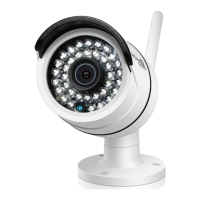
Detailed technical specifications of the camera.
 Power
Power| power input | 12V DC, < 8W |
|---|
 Camera
| night vision range | 15m |
|---|---|
| camera resolution | 1280 x 720, 640 x 360, 320 x 180 |
| viewing angle | 60° |
 Weight and Dimensions
| camera dimensions | 67mm x 181mm x 65mm |
|---|

 To Next Page