18
CZ
SK
EN
PL
HU
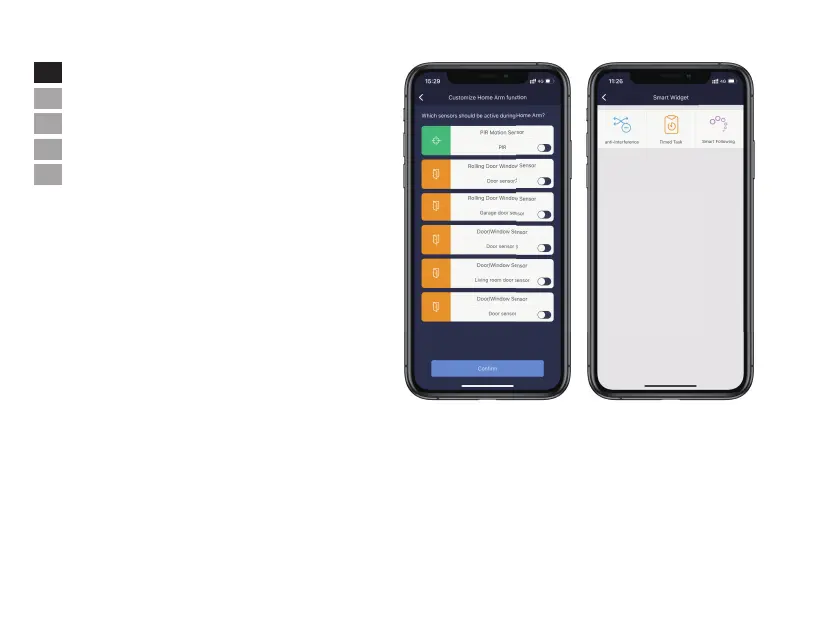
• Smart Widgets
- Anti-interference: by enable this, it will trigger alarm when system
receive interfering signals. Disable anti-interferenceand the system
will ignore interfering signal. (Anti-interference will not function
when the system is in disarm status.)
- Timed Tasks: it allows to schedule a task or a daily task. For instance,
set up a daily task of home arm for the supervised premises at 10 PM.
- Smart Following: when the system is switched to certain status, the pre-setup instructions for chosen accessories will be executed
accordingly. Users can add accessories and configure their status when instructions are executed.
• Home Arm Settings
- Press [Customize Home Arm function] from [System Settings] page.
- By configuring Home Arm status in the APP, users can activate
certain sensors while at home.
- When [Home Arm] button is activated for the first time, the setup
procedure should commence.
- Only those sensors support Home Arm feature will be listed here.


 To Next Page