19
CZ
SK
EN
PL
HU
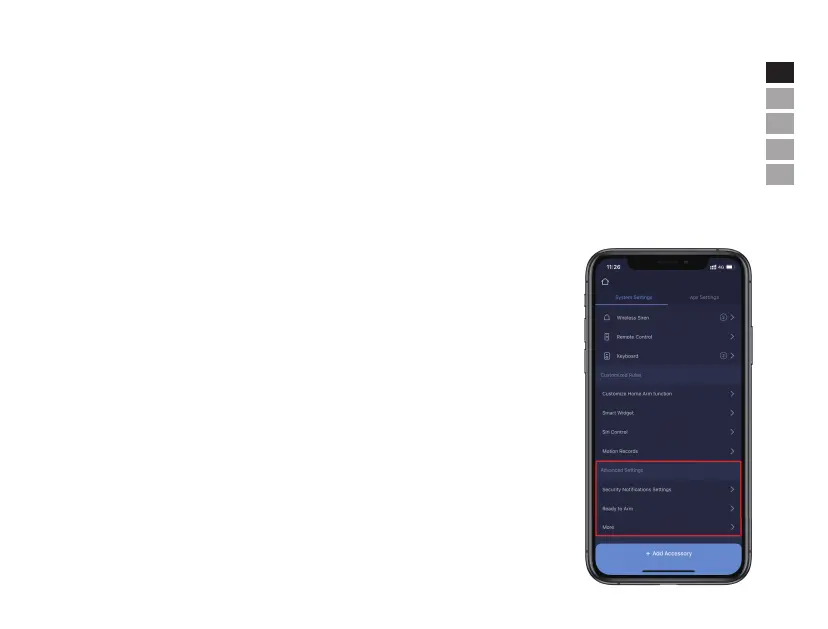
• Advanced Settings
In this section, the following settings can be executed:
- Security Notifications Settings: it allows to setup notification language and duress alarm, which allows users to input pre-set duress code
on the keypad to stop alarm and meanwhile send pre-set emergency messages to other designated contacts. CMS: Please contact your
installer or your local CMS company for further information.
- Ready to Arm: if this feature is enabled, when arm or home arm the premises, the system will notify if there is a contact sensor is in open
status.
- More:
Entry Delay: users can select which sensors should be held for transmitting alarm signals for preset time.
Exit Delay: by enabling this, the system will wait for the preset time before responding to ARM or HOME
ARM instructions.
Siren Duration: it defines how long the built-in siren should sound in event of alarm activation.
Network & Password Settings: it allows to reset the network parameters and the system password.
Arm/Disarm Indication: it allows to turn on/o the sound of indication.
Select Time zone: manually select appropriate time zone.


 To Next Page