17
Bridge & Linked Device Status
a
Bridge Status
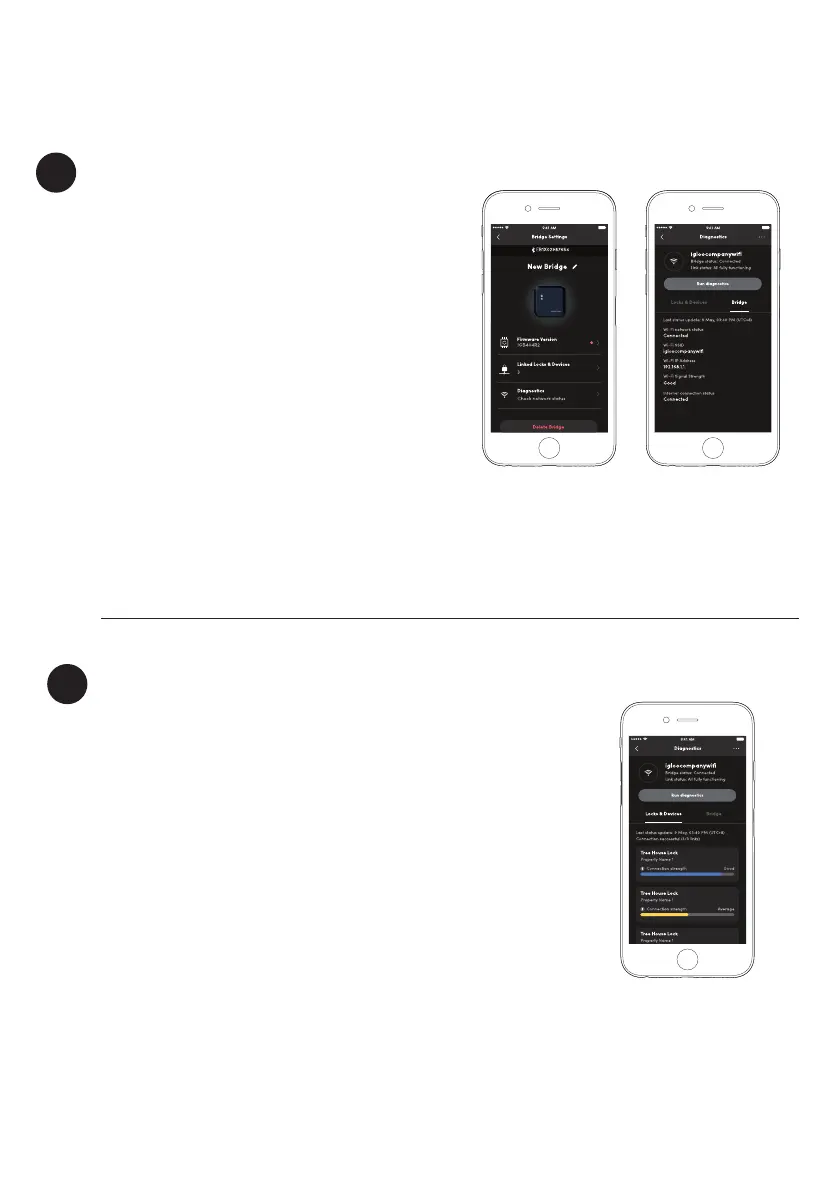
Here are the steps to check the status of your
Bridge as well as all of the linked devices.
1. Select on [Diagnostics] under Bridge Settings
2. Select on [Run diagnostics] to update the
parameters for the Bridge and any linked devices
Under the Bridge tab, the 2.4Ghz WiFi connection
information will be displayed. Here, you can
check if your Bridge is connected to your WiFi
network, the WiFi signal level and connection to
the internet. Ensure that the signal level is strong
enough to get optimal performance from the
Bridge.
The WiFi connection can be changed any time by
selecting the three dots on the top right corner.
Lock/Device Status
Under the Locks and Devices list, all of the linked devices will
show up with their respective Bluetooth signal level. Place
the Bridge and lock in close proximity to ensure reliable
Bluetooth communication between them.
Please refer to the table on page 8 for the maximum ‘line-
of-sight’ distance between the Bridge and lock depending
on the type of lock(s) you are using.
Please note that the actual range will be lower when there
are obstacles between the Bridge and the lock as well as
interference from other electronic devices.
b


 To Next Page