Need help?
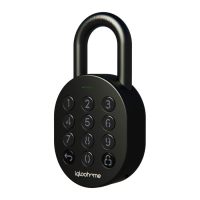
Do you have a question about the Igloohome Padlock 2 and is the answer not in the manual?
Covers Auto Lock, Security Lockout, and Relock Reminder Alert features for enhanced security and convenience.
Adjusts the lock's audible alert volume from mute to loudest.
Includes Low Battery Alerts, Emergency Jumpstart, and Rechargeable Battery information.
Instructions on downloading the mobile application from the App Store or Google Play.
Steps for testing the factory PIN and pairing the lock with your igloohome account.
Procedure for unlocking the padlock using a PIN code and keypad input.
Method for unlocking the padlock remotely using the igloohome mobile app.
Configure the duration before Auto Lock is triggered or disable it.
Set the number of failed attempts before Security Lockout is enabled.
Enable, disable, and configure the duration for the relock reminder alert.
View detailed information about the lock's status and configuration.
Access and view the current firmware version of the lock.
Procedure for removing the lock from your account and resetting it.
Addresses problems with closing the shackle and automatic relocking.
Solutions for keypad errors, LED indications, and low/flat battery issues.
Guidance for when the USB-C jumpstart connection or operation fails.
 General
| Connectivity | Bluetooth |
|---|---|
| Material | Zinc Alloy |
| Battery Life | Up to 1 year |
| Weather Resistance | IP65 |
| Operating Temperature | -20°C to 50°C |
| Battery Type | CR2 |
| Emergency Jumpstart | Yes |
| User Codes | Up to 20 |
| Compatibility | iOS and Android |
| Auto Lock | Yes |
| PIN Code Access | Yes |
| Key Access | No |
| Mobile App | Igloohome App |
| Access Modes | Bluetooth |

 To Next Page