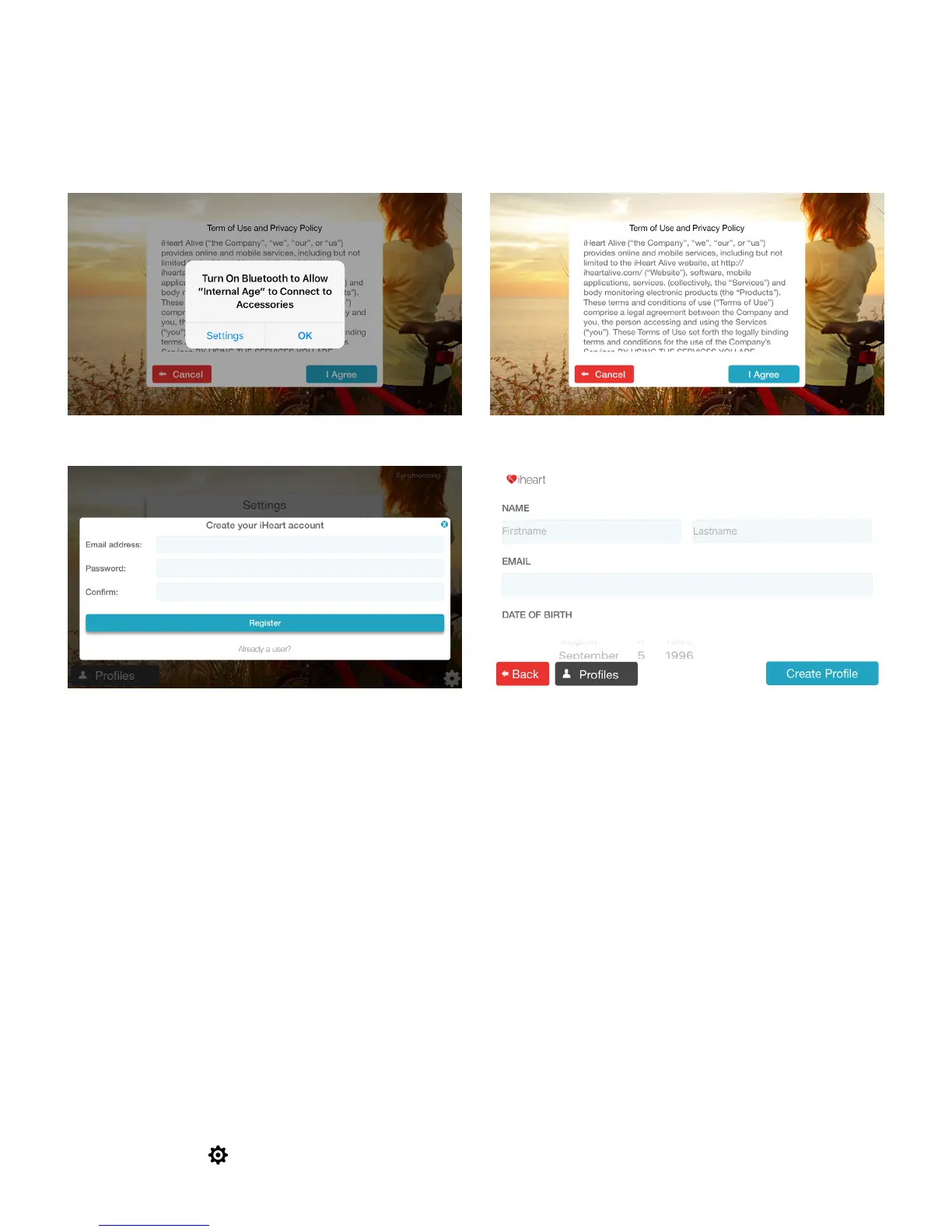
2. Please read iHeart’s Terms of Use and Privacy Policy and press
I Agree
to
proceed
(Fig. 5).
3. You will then be prompted to register your iHeart account. Please enter
your email address and create/confirm a new password of your choice, then
press
Register
(Fig. 6).
3. Creating a profile
After registering you’ll be prompted to create a prole. Enter rst name, last
name, email address, date of birth and gender information (plus photo, height
and weight for Pro users) in the fields provided and press
Create Profile (Fig.
7)
.
Create a profile for each user of the device by pressing
Profiles
in the bottom left-hand corner of the app’s
homescreen, then press
Create New Profile
. Users of the free app can create up to 5 profiles for friends and
family members. Users of the Pro app can create up to 1000 profiles for use with a professional client base.
4. Pairing
Your iHeart device will indefinitely pair with your iPhone/iPad on first use
automatically. If at any point the pairing is lost, however, follow these steps to
pair again.
1. Click on the at the bottom right hand corner of the app homescreen
(Fig.
8)
.
8
(Fig. 4) (Fig. 5)
(Fig. 6) (Fig. 7)



 To Next Page