7
USING ALARMS
ALEXA TONE ALARMS (WAKE TO CUSTOM TONES)
To set a tone alarm: Ask Alexa to set an alarm to your desired wake-up time.
To stop a tone alarm: When the alarm sounds, press the Alexa Button on the
iAVS16 or say ‘Alexa, stop’ to disable the tone alarm.
To snooze a tone alarm: Press the Snooze Button on the iAVS16 or say
‘Alexa, snooze’ to snooze a sounding tone alarm.
ADJUSTING ALARMS
You can use voice commands to ask Alexa to set an alarm to your desired
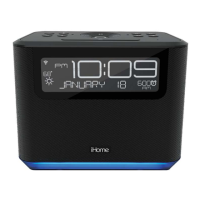
wake-up time. The alarm icon will appear on the iAVS16 display to confirm
that your alarm is set.
There are two ways to adjust your Alexa alarm settings:
* Using Alexa voice commands
* Using the Alexa app
ALARM TYPES
ALEXA MUSIC ALARMS (WAKE TO STREAMING MUSIC)
To set a music alarm: Ask Alexa to set an alarm to your desired wake-up
time and music streaming service.
For example, say:
‘Alexa, set an alarm for 7:00AM to wake to iHeart Radio.’
‘Alexa, set an alarm for 10AM to wake to my Spotify playlist.’
To stop a music alarm: Say ‘Alexa, stop’ to disable a sounding music alarm.
To snooze a music alarm: Say ‘Alexa, snooze’ to snooze a sounding alarm.
Note: Alexa Music Alarms are set to volume level 20 by default.


 To Next Page