EasyManua.ls Logo

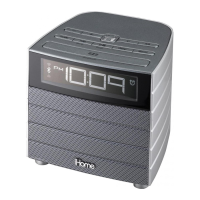
iHome iBT38 - User Manual

iHome iBT38
19 pages
Print Icon
To Next Page IconTo Next Page
Loading...
Model: iBT38
instruction manual
Bluetooth Wireless
FM Clock Radio
with USB Charging
Questions? Contact Customer Service at 1-800-288-2792
Question and Answer IconNeed help?

Do you have a question about the iHome iBT38 and is the answer not in the manual?

Summary

Meet Your iBT38

Display and Setup

Initial Unit Setup

Instructions for connecting the AC adapter and installing the backup battery.

Clock and Alarm Settings

Setting the Clock

Step-by-step guide to setting the current time and 12/24 hour format.

Setting the Alarm

Instructions for setting up the dual alarms for different times and sources.

Alarm Configuration

Alarm Source and Volume

Selecting wake-to sources and adjusting alarm volume settings.

Alarm On;Off and Preview

How to view alarm times and toggle alarms ON/OFF.

Bluetooth Pairing

Device Pairing Process

Step-by-step guide to connecting a Bluetooth device to the iBT38.

Bluetooth Audio and Calls

Charging and Battery

Troubleshooting

Unit Responsiveness Issues

Solutions for units that are unresponsive or have no audio output.

Bluetooth Pairing Problems

Tips for resolving issues when pairing a device via Bluetooth.

Safety Information

Safety Precautions

Summary

Meet Your iBT38

Display and Setup

Initial Unit Setup

Instructions for connecting the AC adapter and installing the backup battery.

Clock and Alarm Settings

Setting the Clock

Step-by-step guide to setting the current time and 12/24 hour format.

Setting the Alarm

Instructions for setting up the dual alarms for different times and sources.

Alarm Configuration

Alarm Source and Volume

Selecting wake-to sources and adjusting alarm volume settings.

Alarm On;Off and Preview

How to view alarm times and toggle alarms ON/OFF.

Bluetooth Pairing

Device Pairing Process

Step-by-step guide to connecting a Bluetooth device to the iBT38.

Bluetooth Audio and Calls

Charging and Battery

Troubleshooting

Unit Responsiveness Issues

Solutions for units that are unresponsive or have no audio output.

Bluetooth Pairing Problems

Tips for resolving issues when pairing a device via Bluetooth.

Safety Information

Safety Precautions

iHome iBT38 Specifications

General IconGeneral
CategoryClock Radio
BrandiHome
ModeliBT38
BluetoothYes
FM RadioYes
AlarmYes
Power SourceAC Adapter
Backup BatteryYes
DisplayLED
USB Charging PortYes
Weight1.5 lbs
Color ChangingYes

Related product manuals