Quick Start Guide
What’s
Included:
AC adapter
iBT294 unit
Quick Set-Up:
The Display
Select the proper plug for your location. Insert
correct plug into adapter and twist to lock into
place. To switch plugs, press button tab and twist
plug to release.
• Remove the battery pull tab from the bottom
of the unit before use.
• Connect the included AC adapter to the DC jack
located on the back of the unit, and connect the
other end to a working wall outlet.
Connecting the Unit
Step One
Setting Your Clock
Step Two
Connecting to Bluetooth
Step Three
• Press and hold the Time Set Button until the
display flashes.
• Press the – or + Buttons to adjust selections and
tap Time Set to confirm.
• Do this for time, year, month and date.
• All done!
Hour Adjust Switch:
The unit ships with the Hour Adjust switch (located
on the bottom of the unit) in 0 position. To adjust
time for Summer Time and Standard Time, slide
switch from 0 to +1 to add an hour or from 0 to -1 to
subtract an hour.
Setting A Sound Alarm
1. Press and hold the Sound Alarm Button for 2 seconds until the alarm time display and alarm
icon flash. A beep sounds.
2. Press the – or + Buttons to adjust the alarm time to the desired time (hold for rapid setting).
3. Press the Sound Alarm Button to confirm the alarm time setting. The alarm schedule will flash:
7 (every day), 5 (weekdays) or 2 (weekend only). Press the – or + Buttons to select the desired
alarm schedule.
4. Press the Sound Alarm Button to confirm the alarm schedule. The wake-to source will flash.
5. Press the – or + Buttons to select a wake-to alarm source: Bluetooth or Tone:
Wake to Bluetooth: Press the Sound Alarm Button to confirm.
Wake to Tone: Press the Sound Alarm Button to confirm. Press the – or + Buttons to select a
tone (T1-T4).
6. Press the Sound Alarm Button to confirm wake-to source. The alarm volume will flash.
7. Press the – or + Buttons to adjust the alarm volume.
8. Press the Sound Alarm Button to confirm alarm volume and exit alarm setting mode. 2 beeps
will confirm alarm setting is complete. The alarm icon on the display indicates alarm is armed.
Setting A Light Alarm
1. Press and hold the Light Alarm Button for 2 seconds until the alarm time display and alarm
icon flash. A beep sounds.
2. Press the – or + Buttons to adjust the alarm time to the desired time (hold for rapid setting).
3. Press the Light Alarm Button to confirm the alarm time setting. The alarm schedule will flash:
7 (every day), 5 (weekdays) or 2 (weekend only). Press the – or + Buttons to select the desired
alarm schedule.
4. Press the Light Alarm Button to confirm the alarm schedule. The wake-to source will flash.
5. Press – or + Buttons to select a wake-to light mode: Dawn, Fade, Fast, Stop, Beat, Sky, or Nite.
6. Press the Light Alarm Button to confirm alarm settings and exit alarm setting mode. 2 beeps
will confirm alarm setting is complete. The alarm icon on the display indicates alarm is armed.
DC 5V 2A
Model: iBT294
Programmable Snooze and Dimmer
Adjust the snooze duration and set a schedule for your clock backlight to automatically dim
and brighten at certain times of the day.
1. Press and hold the Snooze/Dimmer Button until the display starts to flash.
2. Use the + or - Buttons to adjust the snooze duration from 1-29 minutes. Press the
Snooze/Dimmer Button again to confirm.
Now it’s time to set the display dimmer schedule:
3. Use the + or - Buttons to set the AUTO dimmer to ON or OFF. Press Snooze/Dimmer
Button to confirm. (Note: Choosing OFF will simply exit the setting.)
4. Use the + or - Buttons to choose the BRIGHTNESS level for daytime hours. Press
Snooze/Dimmer Button again to confirm.
5. Use the +/- Buttons to set the TIME you want the daytime dimmer to take effect. Press
Snooze/Dimmer Button again to confirm.
6. Use the +/- Buttons to choose the BRIGHTNESS level for nighttime hours. Press
Snooze/Dimmer Button again to confirm.
7. Use the +/- Buttons to set the TIME you want the nighttime dimmer to take effect.
Press Snooze/Dimmer Button again to confirm.
8. Done! The icon will appear on the display when Dimmer Schedule is active.
Snooze: When the alarm is sounding, press the Snooze/Dimmer Button to snooze for 9
minutes.
Dimmer: Press the Snooze/Dimmer Button (when alarm is NOT sounding) to adjust
display brightness.
© 2020 SDI Technologies, Inc. All rights reserved.
Questions? Visit www.ihomeintl.com
Questions? Visit ihomeintl.com
POWERCLOCK GLOW
Bluetooth Speaker + USB Charging
Programmable Dimmer
Bluetooth Status
Light Alarm
Sound Alarm
Using Light Modes
Press the Light Mode Button repeatedly to cycle through 6 different modes:
• Fade
• Fast
• Stop
• Beat
• Sky
• Nightlight
• OFF
Use DIM Buttons to adjust the brightness.
• Press the Power Button.
• Press and hold the Play/Bluetooth Pairing
Button until the display flashes.
• Select ‘iHome iBT294’ from your Bluetooth
device’s menu to connect.
Low Backup Battery
Sleep Mode
Backup Battery
Compartment
Note: Unit must be plugged into working
outlet in order to charge devices.
Snooze/Display Dimmer
Bluetooth Mode
Adapter plugs
(differ by region)
Charging Devices Via USB Port
Connect the standard end of a USB cable (not included) to the USB Port on the
back of the unit, and connect the other end to the charging port on your device.
Monitor the charging on your device. Some devices use a proprietary charging
method and will not charge using the USB port. If this happens, you must charge
your device using the charger that came with it.
Use the Color Quick Select Buttons to select Fade/Fast, One Color, Sky, or Nightlight.
Previewing the Alarm
Press and release the Light Alarm Button or Sound Alarm Button to view the current alarm
settings.
Turning the Alarm On/Off
1. Press and release the corresponding Alarm Button (Light or Sound) twice within 5
seconds to toggle the alarm ON and OFF, indicated by the related white alarm indicator.
2. When the alarm sounds, press the corresponding Alarm Button (Light or Sound) or the
Power Button to disable the alarm and reset it to come on at the same time the next day.
Sleep Mode
To set a sleep timer:
1. Press the Sleep Button as needed to cycle to the desired sleep timer duration: 120, 90,
60, 30, 15 minutes, or OFF.
2. Press and release the Sleep Button during Sleep Mode to review the remaining sleep
time.
Controls Overview
DC Jack
(5V/2A)
Rear Controls Light Modes
Time Set Button
USB Charging Port
(5V/1A)
PM Indicator
Note: By default, the unit is set to
a 24 hour clock display. To adjust
to 12 hours, press the Light
Alarm or Sound Alarm Button
while in Time Set mode.
iBT294 - QSG - Int’l version (English/French)
Size: 560 x 160 mm (unfold), 140 x 160 mm (folded)
Color: Black (1C + 1C)
Material: 85gsm, WF paper
May 25, 2020
Battery Back-Up
The unit uses a CR-2450 back-up battery to provide continuous alarm operation and clock
settings in the event of a temporary power failure. Remove the battery pull tab before use.
When the battery icon on the clock display is flashing, it is time to replace the back-up
battery. The battery compartment is located on the bottom of the unit.
1. Make sure the AC adapter is connected, or you will lose
your time and alarm settings during battery replacement.
2. Use a Phillips screwdriver to open the battery compartment
door.
3. Insert a fresh CR-2450 battery, checking that the polarity
match the markings on the unit. Replace the compartment
door. Do not overtighten.
iBT294E_QSG_EF_051920_A
Printed in China
IMPORTANT SAFETY INSTRUCTIONS
Please heed all warnings, read and follow all instructions and keep these instructions handy
for future reference.
1. Do not use this product near water, and clean only with dry cloth.
2. Do not block any ventilation openings. Install in accordance with the manufacturer’s
instructions.
3. Heat – This product should be situated away from heat sources such as radiators, heat
registers, stoves or other appliances (including amplifiers) that produce heat.
4. Only use attachments/accessories specified by the manufacturer.
5. Unplug this product during lightning storms or when unused for long periods of time.
6.
Damage Requiring Service – This product should be serviced by qualified service personnel when:
- Plug has been damaged.
- Objects have fallen into or liquid has been spilled into the enclosure.
- The unit has been exposed to rain. The unit has been dropped or the enclosure damaged.
- The unit exhibits a marked change in performance or does not operate normally.
7. No naked flame sources, such as lighted candles, should be placed on this product.
8. Attention should be drawn to the environmental aspects of battery disposal.
9. This product is suitable for use in tropical and/or moderate climates.
10. WARNING: To reduce the risk of fire or electric shock, do not expose this product to rain
or moisture.
11. Do not dispose of batteries in the household trash or fire.
12.
The mains plug of power adaptor is used as the disconnect device, it shall remain readily operable.
Maintenance
• Remove plastic protective film from the clock display.
• Place the unit on a level surface away from sources of direct sunlight or excessive heat.
• Protect your furniture when placing your unit on a natural wood and lacquered finish.
A cloth or other protective material should be placed between it and the furniture.
• Clean your unit with a soft cloth moistened only with mild soap and water. Stronger cleaning
agents such as thinner or similar materials can damage the surface of the unit.
WARNING
• Do not ingest the battery, Chemical Burn Hazard. This product contains a coin/button cell
battery. If the coin/button cell battery is swallowed, it can cause severe internal burns in just
2 hours and can lead to death.
• Keep new and used batteries away from children. If the battery compartment does not
close securely, stop using the product and keep it away from children. If you think batteries
mtight have been swallowed or placed inside any part of the body, seek immediate medical
attention.
• CAUTION - RISK OF EXPLOSION IF BATTERY IS REPLACED BY AN INCORRECT TYPE.
DISPOSE OF USED BATTERIES ACCORDING TO THE INSTRUCTIONS.
This product bears the selective sorting symbol for waste electrical and electronic equipment
(WEEE).
This means that this product must be handled pursuant to European Directive 2012/19/EU in order
to be recycled or dismantled to minimize its impact on the environment.
For further information, please contact your local or regional authorities.
Electronic products not included in the selective sorting process are potentially dangerous for
the environment and human health due to the presence of hazardous substances.
AC adapter Information for ErP (EU) requirement
Manufacturer's name and address
SDI Technologies Inc.
Model AK18WG-0500200DP
Input voltage AC100-240V
Input AC frequency 50/60Hz
Output voltage DC5V
Output current 2A
Output power 10W
Average active efficiency 83.5%
Efficiency at low load (10%) 76.01%
No-load power consumption 0.05W
1299, Main Street, Rahway, NJ 07065, U.S.A.
Press Light Mode to cycle through colors.
Use DIM Buttons to adjust the brightness.
Front
Cover
English

 Need help?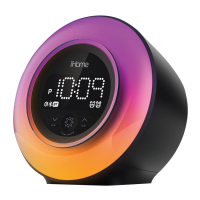







 To Next Page
 General