EasyManua.ls Logo

iiNet Budii - Budii Overview; Device Indicators and Front Panel Features; LED Customization Options

iiNet Budii
20 pages
Print Icon
To Next Page IconTo Next Page
To Previous Page IconTo Previous Page
Loading...
10
Budii
TM
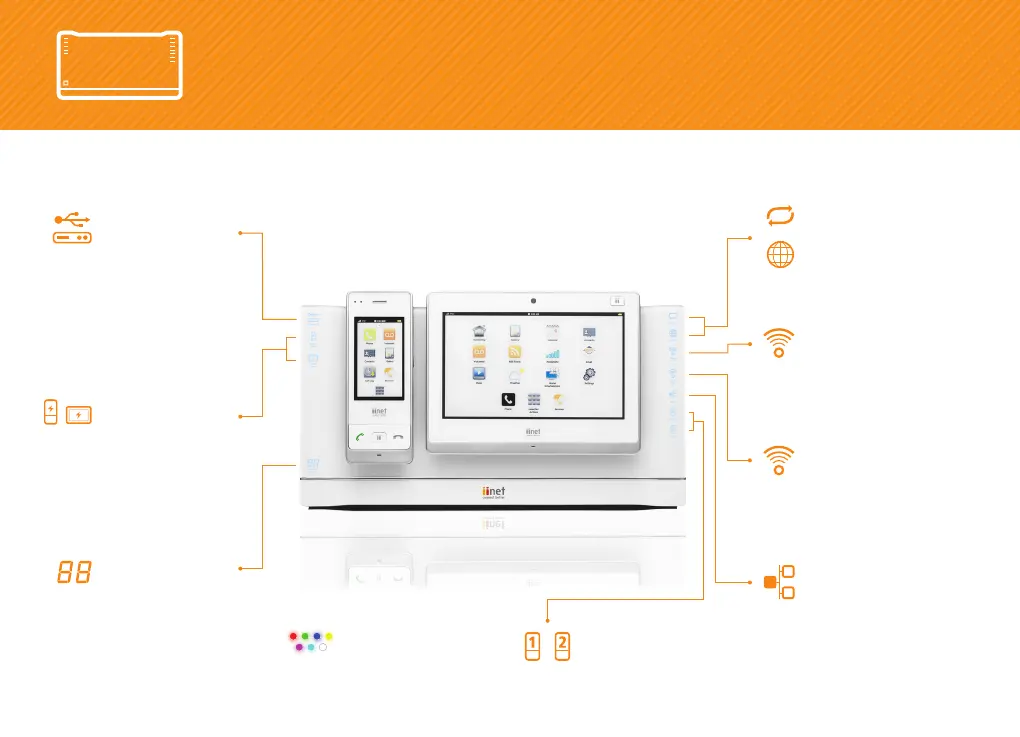
Overview
Storage
Lights up if you’ve
connected an external
USB hard-drive.
ADSL Sync
and Internet
Lights up when Budii's
Internet connection is
working.
Wireless 2.4GHz
Lights up when Budii's
standard wireless
network is ready for
wireless devices to
connect.
Wireless 5GHz
Shows Budii's 5GHz
Celeno wireless feature
is ready for connections
and fetchtv.
Wired
Indicates when Budii's
wired (Ethernet) ports
are in use.
Answering Machine
Shows the number
of phone messages
waiting for you.
Phones
Displays your active
Netphone phone lines.
LED Options
Personalise Budii's
icon colour.
The iiNet Budii
TM
, with handset and tablet in charging position.
Can also be charged in separate chargers supplied by iiNet.
Handset Charge and
Tablet Charge
Shows that your iiNet
handset or tablet is
charging.

Other manuals for iiNet Budii

Related product manuals