EasyManua.ls Logo

iiNet Budii - Budii Back Panel Ports and Buttons; ADSL Internet and Wired Ports; Storage and Audio Ports; Telephone and Network Connectivity

iiNet Budii
20 pages
Print Icon
To Next Page IconTo Next Page
To Previous Page IconTo Previous Page
Loading...
11
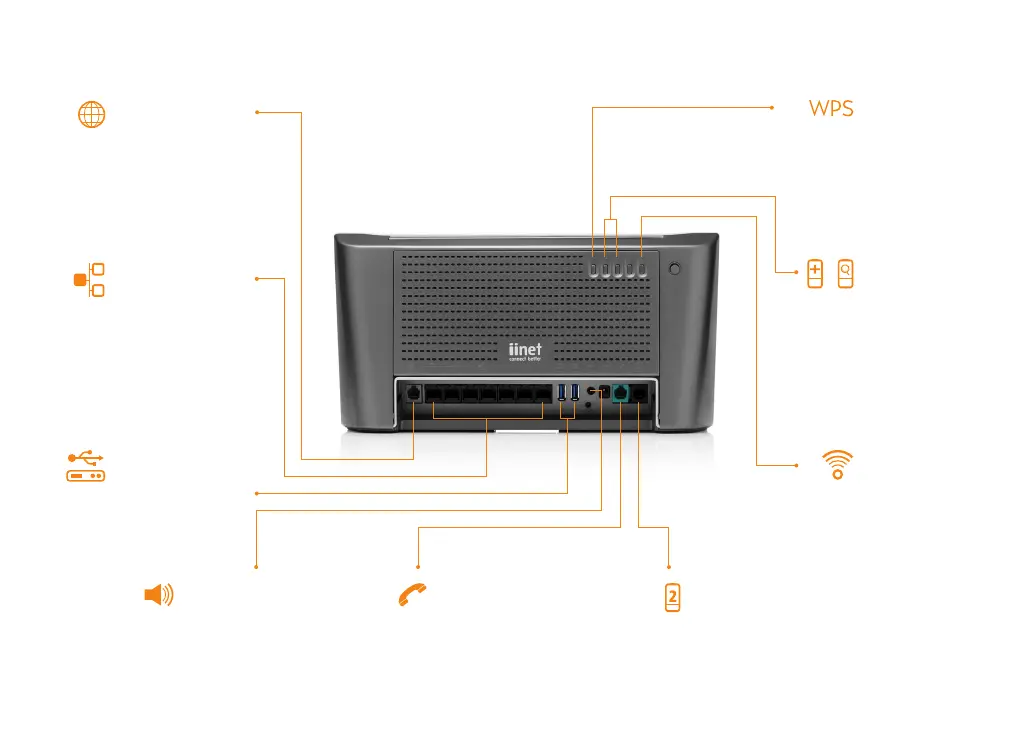
Storage
For external USB hard
drives for sharing
photos, music and
documents.
ADSL Internet
Phone cable plugs
into this port and
connects Budii
TM
to
the Internet.
Wireless On/Off
For peace of
mind, turn Budii’s
wireless on or off
when not in use.
Wired
Seven super-fast
Gigabit Ethernet
ports. There’s also a
dedicated port for
NBN/FTTH when
available in your area.
PSTN
Hook up your home
telephone line to Budii
TM
, if
you want to answer calls
using your iiNet handset.
Netphone
Plug in a secondary
handset if you want
to receive calls on a
standard telephone.
Find and Pair
Press the Pair
button to pair your
iiNet DECT handset
or tablet with
Budii
TM
; or press Find
to locate an already
paired device.
3.5mm Audio Out
Stream Internet radio to a
set of speakers, or connect
your home amp and listen
to music directly from the
Internet.
WPS
Set up wireless
computers easily
and securely.