16
ABOUT THE SETTINGS ON THIS PAGE
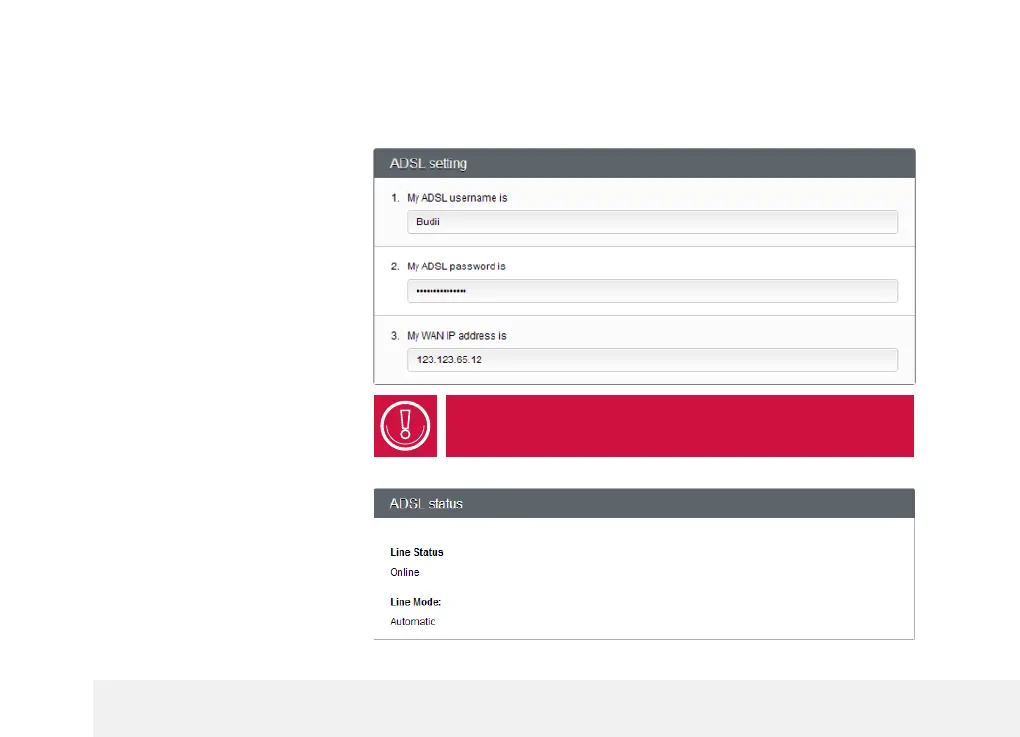
ADSL
3
Setting
3
ADSL stands for Asynchronous Digital Subscriber Line. It is a popular broadband Internet service provided over the telephone line.
ADSL username:
The username you chose when you
set up your service with us.
ADSL password:
The password assigned to you,
found in your welcome email.
WAN IP address:
Budii’s IP address when viewed from
the outside world. Other computers
on the Internet use this IP address
to send data through Budii to your
computer.
If you have fetchtv, you won’t see the ADSL username
and password options.
ADSL Status
Line Status:
Tells you whether your service is up
and running.
Line Mode:
Tells you the ADSL standard you're
using to connect to the Internet.



 To Next Page