EasyManua.ls Logo

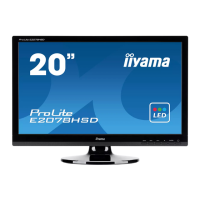
Iiyama ProLite E2078HSD - User Manual

Iiyama ProLite E2078HSD
27 pages
Print Icon
To Next Page IconTo Next Page
Loading...
ENGLISH
USER MANUAL
Thank you very much for choosing the iiyama
LCD monitor.
We recommend that you take a few minutes
to read this comprehensive manual carefully
before installing and switching on the monitor.
Please keep this manual in a safe place for
your future reference.

Other manuals for Iiyama ProLite E2078HSD

Question and Answer IconNeed help?

Do you have a question about the Iiyama ProLite E2078HSD and is the answer not in the manual?

Summary

For Your Safety

Safety Precautions and Warnings

Essential safety guidelines, warnings, and cautions for operating and handling the monitor.

Operating the Monitor

OSD Navigation and Button Operations

How to access and navigate the monitor's adjustment menus using buttons.

Auto Adjust Function

Automatic adjustment for picture position, pixel clock, and phase.

Luminance and Contrast Settings

Adjusting screen brightness and contrast levels for optimal viewing.

Geometry and Color Adjustments

Manually adjusting picture position, pixel clock, phase, and color temperature.

Screen Adjustments

Automatic and Manual Adjustment Guide

Step-by-step procedures for optimizing picture quality using adjustment patterns.

Power Management Feature

Trouble Shooting

Common Problems and Solutions

Troubleshooting guide for common issues like no picture, sync problems, or sound issues.

Audio Troubleshooting

Specific steps to resolve audio-related problems such as no sound or noise.

Summary

For Your Safety

Safety Precautions and Warnings

Essential safety guidelines, warnings, and cautions for operating and handling the monitor.

Operating the Monitor

OSD Navigation and Button Operations

How to access and navigate the monitor's adjustment menus using buttons.

Auto Adjust Function

Automatic adjustment for picture position, pixel clock, and phase.

Luminance and Contrast Settings

Adjusting screen brightness and contrast levels for optimal viewing.

Geometry and Color Adjustments

Manually adjusting picture position, pixel clock, phase, and color temperature.

Screen Adjustments

Automatic and Manual Adjustment Guide

Step-by-step procedures for optimizing picture quality using adjustment patterns.

Power Management Feature

Trouble Shooting

Common Problems and Solutions

Troubleshooting guide for common issues like no picture, sync problems, or sound issues.

Audio Troubleshooting

Specific steps to resolve audio-related problems such as no sound or noise.

Iiyama ProLite E2078HSD Specifications

General IconGeneral
Panel TypeTN
Resolution1600 x 900
Brightness250 cd/m²
Contrast Ratio1000:1
Response Time5 ms
Refresh Rate60 Hz
ConnectivityVGA, DVI-D
Viewing Angle (Horizontal/Vertical)170°/160°
Built-in SpeakersNo
VESA Mount100 x 100 mm
Aspect Ratio16:9
Weight3.5 kg

Related product manuals