ENGLISH
14 OPERATING THE MONITOR
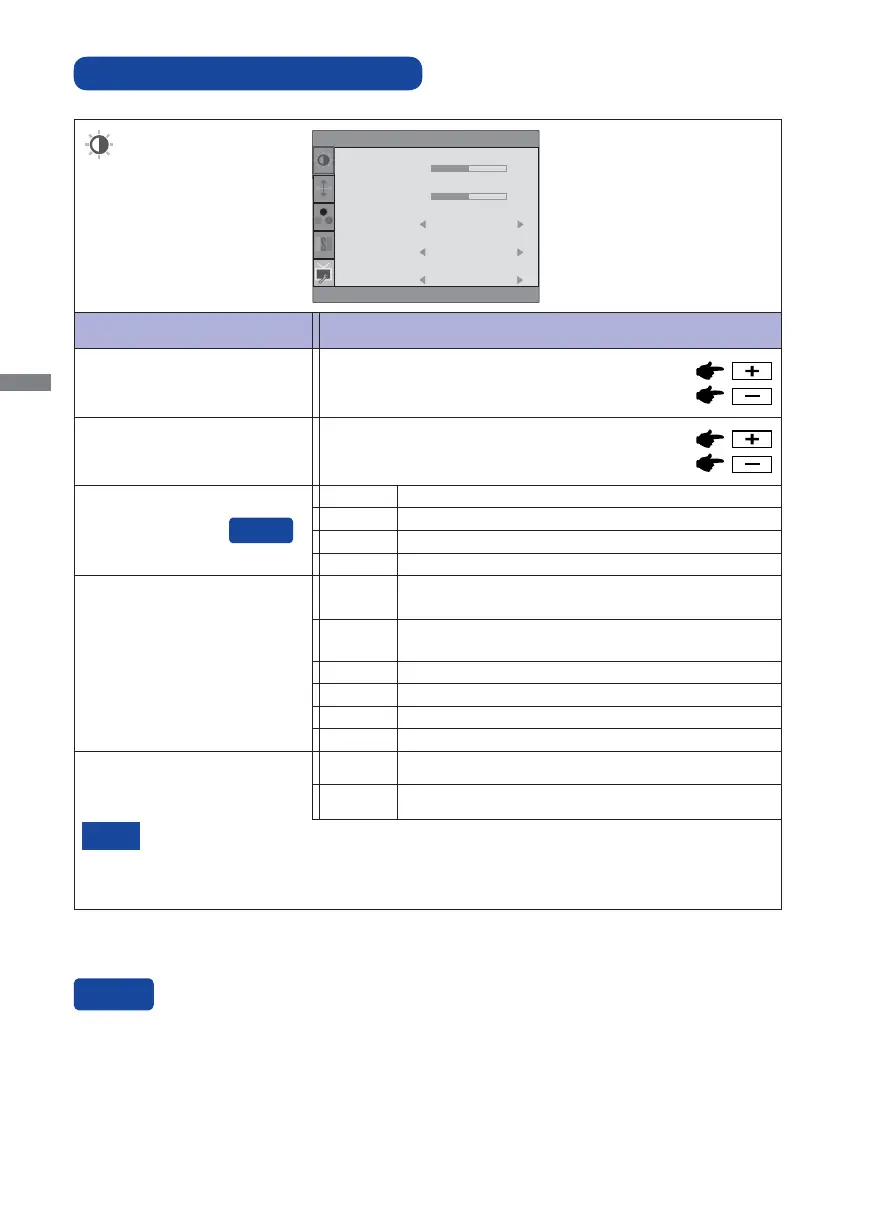
ADJUSTMENT MENU CONTENTS
Adjustment Item Problem / Option Button to Press
Luminance
Too dark
Too bright
Brightness *
Contrast
Too dull
Too intense
*
Adjust the Brightness when you are using the monitor in a dark room and feel the screen is too
bright.
Luminance
Contrast
Brightness
Eco
i-Style Color
50
50
Off
Standard
ACR
ON
Mode1 Brightness of back-light is reduced.
Mode2
Brightness of back-light is reduced more than Mode1.
Off Normal
Eco
Mode3
Brightness of back-light is reduced more than Mode2.
i-Style Color
Standard
For general windows environment and monitor default
setting.
Text
For text editing and viewing in a word processing
environment.
Internet
For internet environment.
Game
For PC game environment.
Movie
For movie and video environment.
Sports
For sport environment.
ACR
Increased Contrast Ratio
On
Off
Typical Contrast Ratio
ACR adjusts brightness according to the image, and improve the contrast ratio during move
playing.
Contrast, Brightness, sRGB, Eco and Picture Mode cannot be adjusted and selected while
ACR is active.
NOTE
You can skip the Menu items and display an adjustment scale directly by using the following button
operations.
ECO: Press the - Button when the Menu is not displayed.







 To Next Page