ENGLISH
OPERATING THE MONITOR 11
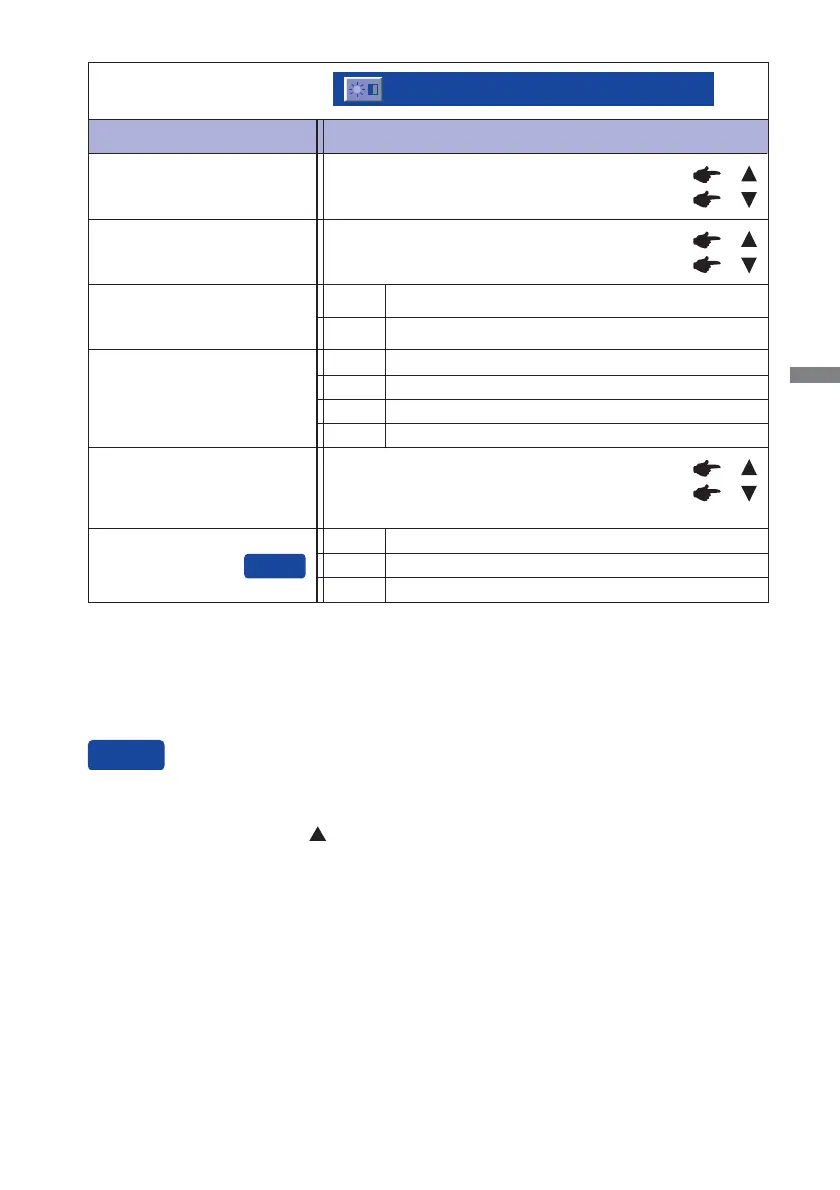
Too dark
Too bright
Brightness *
1,2,3
Too dull
Too intense
*
1
Adjust the Brightness when you are using the monitor in a dark room and feel the screen is too
bright. Can not select when Adv. Contrast is On.
*
2
Brightness and Adv. Contrast can not enable the same time when ECO Mode is on.
*
3
Contrast, Brightness, Adv. Contrast and ECO Mode adjustments are disabled when i-Style Color
is activated.
Brightness of back-light is reduced.
Off Normal
ECO Mode *
3
Adv. Contrast *
2,3
Increased Contrast RatioOn
Off
Typical Contrast Ratio
Adjustment Item Problem / Option Button to Press
Picture Adjust
Picture Adjust
Contrast *
3
1
Brightness of back-light is reduced more than 1.2
Brightness of back-light is reduced more than 2.3
Over Drive
Off / -2 / -1 / 0 / +1 / +2
It will improve the gray level response time of the
LCD panel.
A higher level results in a faster response time.
Enhance the picture edge.
Off Normal
Soft
Enhance the picture edge more than Soft option.Hard
X-Res Technology
You can skip the Menu items and display an adjustment scale directly by using the following button
operations.
X-Res Technology: Press the
Button when the Menu is not displayed.







 To Next Page