ENGLISH
OPERATING THE MONITOR 15
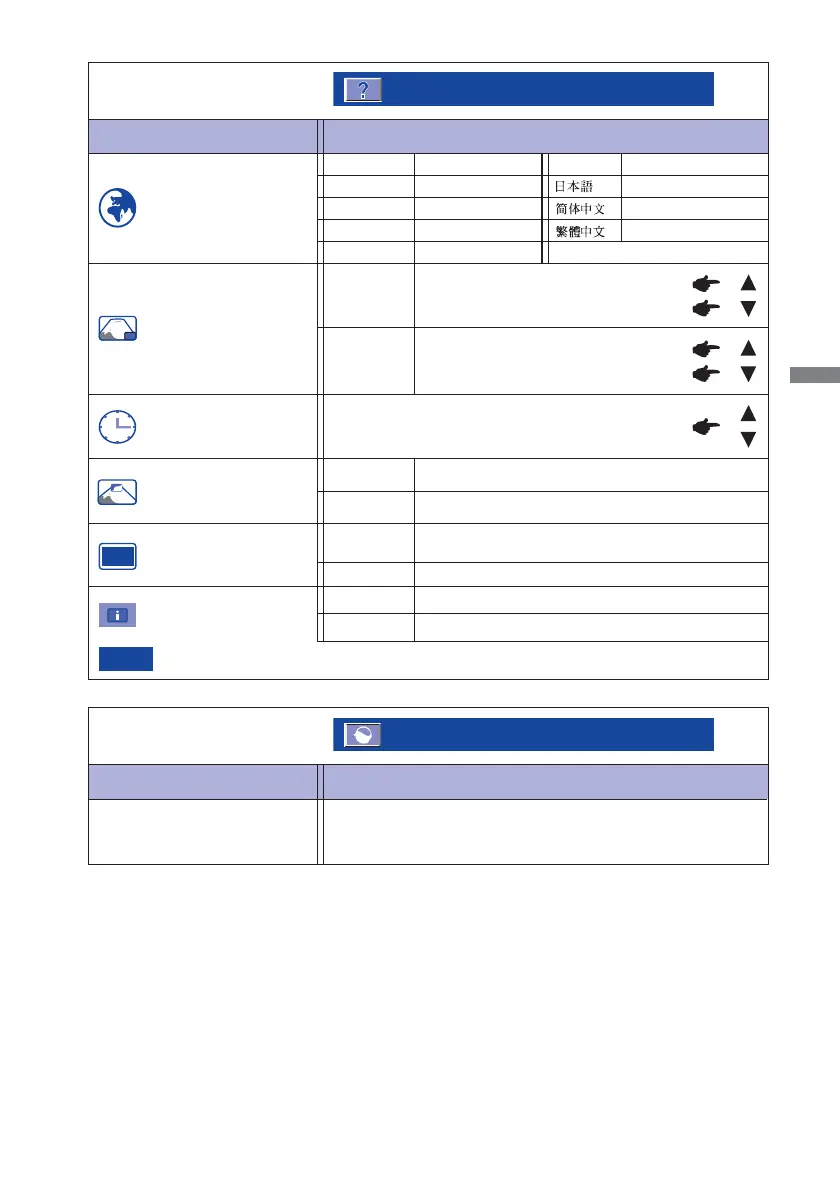
Memory Recall
Factory-preset data is restored.
English
Deutsch
English
German
Français
French
Japanese
Russian
Polski
Polish
Traditional Chinese
Simplifi ed Chinese
Nederlands
Dutch
Русский
H.Position
OSD is too left
OSD is too right
OSD is too low
OSD is too high
You can set the OSD display duration time.
5 / 15 / 30 / 60 seconds
V.Position
Adjustment Item
Problem / Option Button to Press
Setup Menu
Setup Menu
Language Select
OSD Position
OSD Time Out
OSD Background
LED
The background of OSD is mode transparent.
Off Retune the background of OSD.
On
The Power Indicator is turned On.
Off
The Power Indicator is turned Off.
On
Turn Off the Power Indicator when you are bothered by the light.
NOTE
Adjustment Item Problem / Option Button to Press
Memory Recall
Memory Recall
iiyama Logo displayed when the monitor is turned on.
On
Off
iiyama Logo does not display when the monitor is
turned on.
Opening Logo
IIIIII
IIIIIII







 To Next Page