ENGLISH
24 OPERATING THE MONITOR
ADJUSTMENT MENU CONTENTS
Adjustment Item Problem / Option Button to Press
Too dark
Too bright
Brightness*
1
Contrast
Too dull
Too intense
*
1
Adjust the Brightness when you are using the monitor in a dark room and feel the screen is too bright.
*
2
Only AV,S-Video and YPbPr inputs.
*
3
Backlight and ACR are disabled when the Ambient Light Sensor is active.
Picture Mode*
2
User
Vivid
Cinema
Standard
Displays a picture on a screen set by Image
Settings adjustments.
For displaying outdoor scenery images.
For movie and video environment.
For general windows environment and monitor
default setting.
Sharpness
Too soft
Too sharp
Color*
2
Too week
Too strong
Tint*
2
Purplish
Greenish
Backlight*
3
Brightness of back light is reduced.
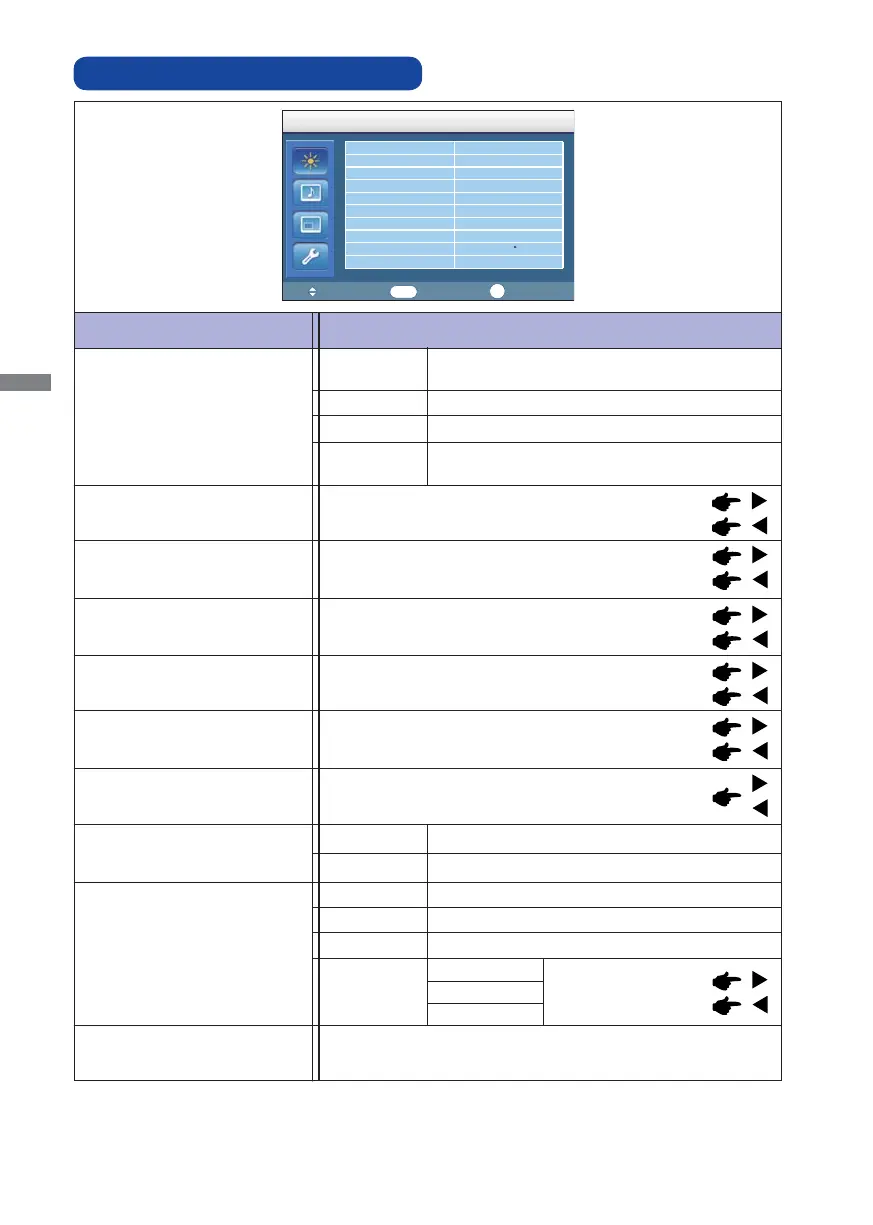
Picture
Picture Mode Standard
Contrast 88
Brightness 43
Color 55
Tint 50
Sharpness 5
Backlight 5
ACR OFF
Color Temp.
9300 K
Input Resolution
:Move
:Enter
:Exit
Picture
Enter
Exit
ACR*
3
ON
OFF
Too weak
Too strong
User
Bluish white
Red
Green
Blue
9300°K
Reddish white 6500°K
Strong Bluish white 12000°K
Color Temp.
Increased Contrast Ratio
Typical Contrast Ratio
Input Resolution
Not available on this model.




 To Next Page