EasyManua.ls Logo

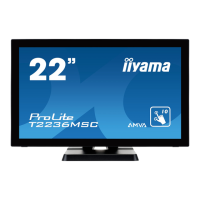
Iiyama ProLite T2236MSC - User Manual

Iiyama ProLite T2236MSC
30 pages
Print Icon
To Next Page IconTo Next Page
Loading...
ENGLISH
Thank you very much for choosing the iiyama
LCD monitor.
We recommend that you take a few minutes
to read this comprehensive manual carefully
before installing and switching on the monitor.
Please keep this manual in a safe place for
your future reference.
USER MANUAL
Question and Answer IconNeed help?

Do you have a question about the Iiyama ProLite T2236MSC and is the answer not in the manual?

Summary

Troubleshooting Preparation

Things to check before you call the iiyama information line

Checklist for troubleshooting before contacting support.

For Your Safety

Safety Precautions

Critical safety instructions to prevent hazards like fire or electric shock.

Installation Location

Maintain Good Ventilation

Before You Operate the Monitor

Features

Lists the key features and specifications of the monitor.

Wall Mounting

Controls and Connectors

Connecting Your Monitor

Computer Setting

Operating the Monitor

Adjustment Menu Contents

Image Setup

Color Temp.

OSD Setup

Extra

Screen Adjustments

Power Management Feature

Trouble Shooting

SPECIFICATIONS: ProLite T2236 MSC

Summary

Troubleshooting Preparation

Things to check before you call the iiyama information line

Checklist for troubleshooting before contacting support.

For Your Safety

Safety Precautions

Critical safety instructions to prevent hazards like fire or electric shock.

Installation Location

Maintain Good Ventilation

Before You Operate the Monitor

Features

Lists the key features and specifications of the monitor.

Wall Mounting

Controls and Connectors

Connecting Your Monitor

Computer Setting

Operating the Monitor

Adjustment Menu Contents

Image Setup

Color Temp.

OSD Setup

Extra

Screen Adjustments

Power Management Feature

Trouble Shooting

SPECIFICATIONS: ProLite T2236 MSC

Iiyama ProLite T2236MSC Specifications

General IconGeneral
Screen Size21.5 inch
Panel TypeIPS
Resolution1920 x 1080
Brightness250 cd/m²
Contrast Ratio1000:1
Response Time5 ms
Aspect Ratio16:9
Viewing Angles178°/178°
Built-in SpeakersYes
VESA Mount Compatibility100 x 100 mm
Tilt AdjustmentYes
Swivel AdjustmentNo
Height AdjustmentNo
Pivot AdjustmentYes
Touch TechnologyCapacitive
ConnectivityHDMI, DisplayPort, USB

Related product manuals