Quick Start Instructions
1. Open the iKeyp by inserting one of the backup
keys into the keyhole and turning it counter-
clockwise (to the le) until the main compartment
door gently pops open.
2. Identify all items in the box listed on the previous
page. If any parts are missing or defective, please
call Customer Support at +1 (800) 485-8904 for
replacement parts.
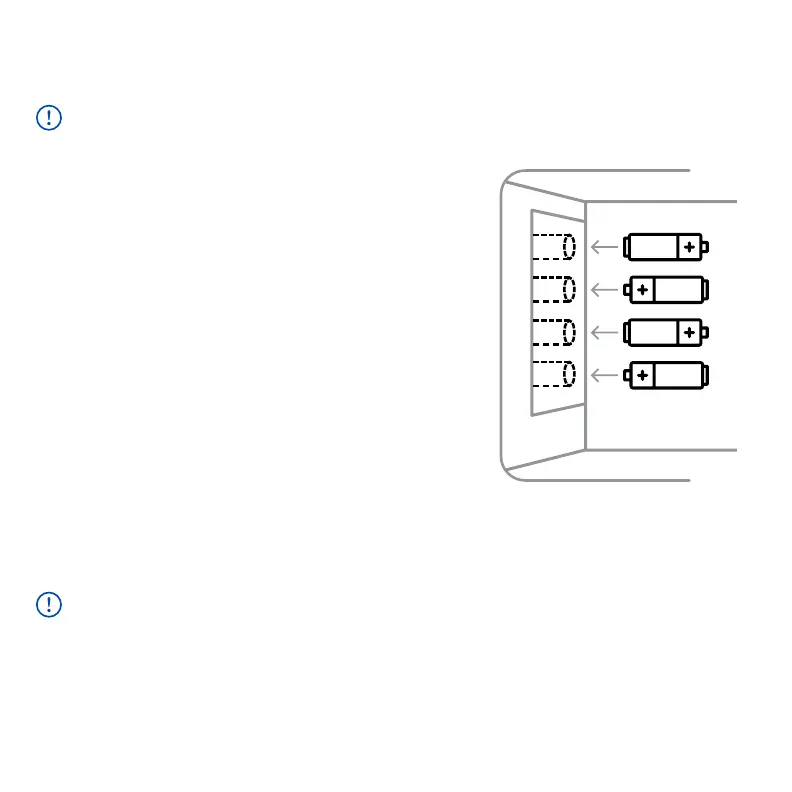
3. Insert four (4) new AA Alkaline batteries into
the battery compartment (located on the inside
le of the main compartment) by first opening
and removing the battery cover. Ensuring correct
polarity according to Diagram A (right), insert
the batteries, then replace and securely close the
battery cover.
Carefully unpack the iKeyp Bolt from the retail packaging box.
IMPORTANT
1) Do NOT use or place rechargeable batteries in the iKeyp Bolt battery compartment.
2) Do NOT mix old and new batteries.
3) Do NOT mix alkaline and standard (carbon-zinc) batteries.
DIAGRAM A
2
AA
AA
AA
AA



 To Next Page