9
Orientation CD, DVD, Microphone & FM Radio
Loading and Playing a DVD
1. Open the Disc Door.
2. Load a DVD into the player, label side facing up.
3. Close the Disc Door.
4. Press the Source button to set the unit to DVD mode. The player will automatically detect the DVD
and begin playing video.
Programming a CD or DVD
1. While the loaded disc is playing, press the Program button on the remote.
2. Use the Arrow and Number Keypad buttons to enter in the track numbers, titles or chapters in the order you
want to play them.
3. When you have finished, select “Play” at the bottom of the menu and press the OK button. The unit will begin
playing tracks, titles or chapters according to the program.
Programming Memory Presets
1. With the FM Radio on and the video display up, tune the unit to the desired radio station using the Tuning
Dial on the unit , or the Tune +/- buttons on the remote.
2. Press the Mem button on the unit or the remote. The display will read “Save”. Press the Mem +/- buttons on
the unit or the remote to select a Memory Preset (1 to 20). Press the Mem button again to save the radio
frequency to that preset.
3. Your Memory Preset has been saved, press the Mem +/- buttons on the unit or the remote to cycle through
your saved radio stations.
Loading and Playing a CD
1. Open the Disc door.
2. Load a CD, CD-R/RW, MP3 CD or CD+G disc into the player, label side facing up.
3. Close the Disc door.
4. Press the Source button to set the unit to DVD mode. The player will automatically detect the CD
and begin playing music.
Playing the FM Radio
1. Set the Source to FM mode.
2. Adjust the Tuning dial to tune the radio. Adjust the position of the Telescopic FM Antenna to improve FM
radio reception.
Using a Microphone
The unit has a 3.5mm microphone input to allow unit to be used as a karaoke machine. Simply plug the
microphone in and it will be heard over the speakers. A microphone is not included with the unit.
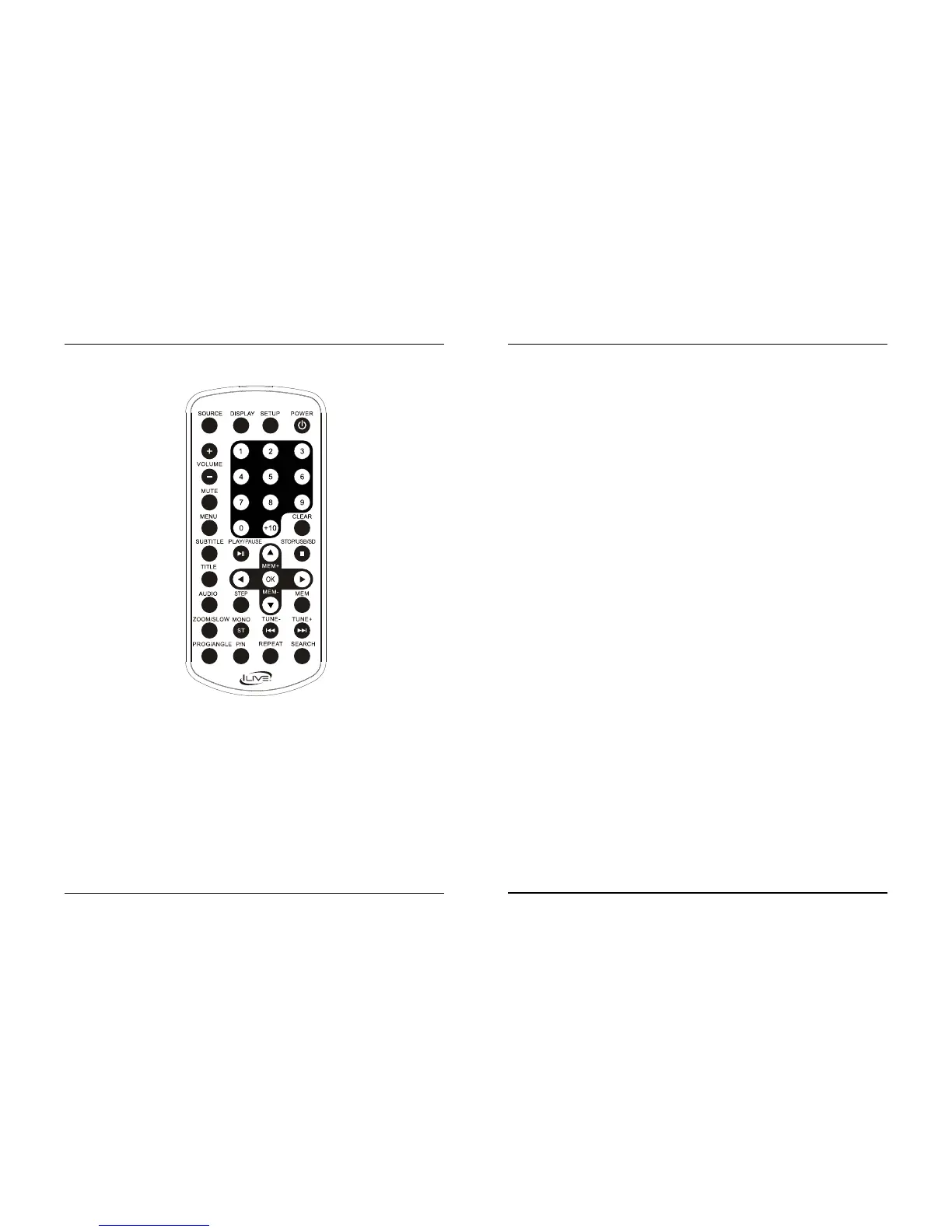
Remote
Source
Press to select, FM, AV,
Line in , DVD or BT.
Display
Press to view
the on screen display.
Volume +/-
Press to adjust the
volume up or down.
Mute
Press to mute the volume.
Subtitle
Press to cycle through
available subtitle options.
Play/Pause
Press to play or
pause a loaded disc or track.
Title
Press to view the title
menu on the loaded DVD.
Audio
Press to cycle through
available audio options.
Step
Press repeatedly to step
through frames on a DVD.
Zoom/Slow
Press repeatedly to zoom
in or out on a loaded DVD.
Press and hold to play
a DVD in slow motion.
Mono/ST
Press to switch between mono
or stereo speaker modes.
Prog/Angle
Press to program media
playing on the device.
Press to activate the angle
feature on supported DVDs
during play.
P/N
Press to switch between
Auto, PAL and NTSC.
Setup
Press to access the setup menu.
Power
Press to power the unit on.
Number Keypad
Clear
Press to clear any
current programs.
Stop/USB/SD
Press to stop a loaded disc
during play. In DVD mode,
press and hold to enter USB/
Card selection mode.
Arrows/OK
Press to navigate menus
and make selections.
Mem+/-
Press to cycle through
saved FM radio stations.
Mem
Press to save FM radio
stations to Memory.
Prev/Next/Tune+/-
Press to skip between audio
tracks or DVD chapters. In BT
mode, press to skip between
tracks. In FM Mode, press to
tune the FM radio.
Repeat
Press to repeat a chapter, title,
track, or the entire disc.
Search
Press to search a loaded disc for
a specic track or chapter.



 To Next Page
 Loading...