8
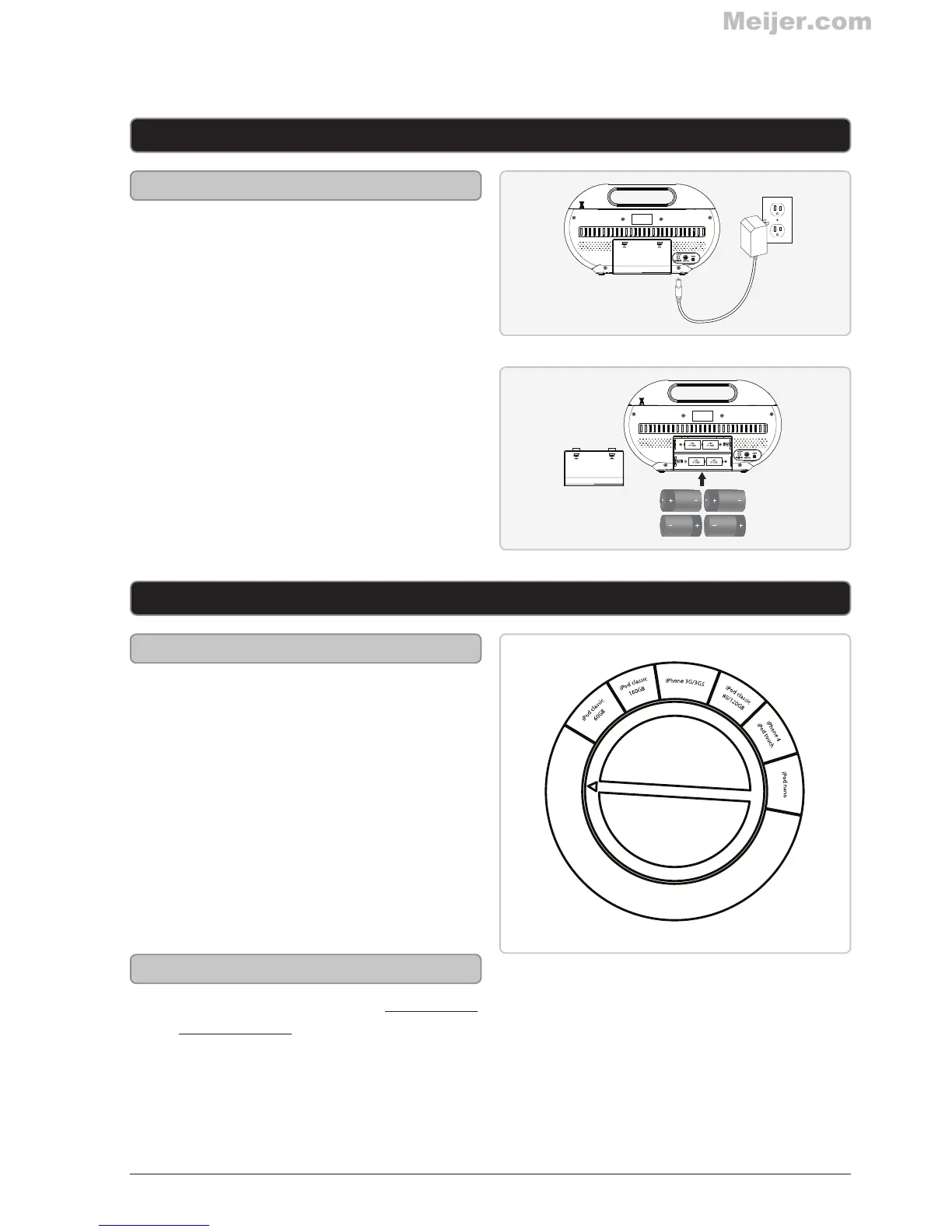
DC Power Input: Requires an AC/DC power
adapter (included)
DC Battery Power: Requires 4 C batteries
(not included)
1. Turn the Adjustable Dial for iPod
and iPhone to the appropriate depth
for the iPod or iPhone model you are
wanting to dock.
2. Connect your iPod or iPhone to the
Dock for iPod and iPhone.
After docking, if your iPod or iPhone is
not well supported by the adjustable
dial, remove the docked iPod or iPhone
and readjust the dial to the appropriate
depth.
1. Follow the instructions for Docking an
iPod or iPhone.
2. Press the Source button to switch to
iPod mode.
3. Press the Play/Pause/M+ button.
Power
Docking an iPod or iPhone
Playing a Docked iPod or iPhone
Setup
iPod and iPhone



 To Next Page