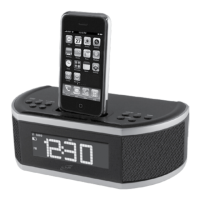
iPod/iPhone AND RADIO
DOCKING AN iPhone or iPod
PLAYING AN iPhone or iPod
1 Locate the numbered bracket
that ts the iPod/iPhone
model that will be docked.
Each included bracket has a
number on it, indicating which
iPod/iPhone model that bracket
is compatible with. See the
separate bracket chart page to
identify which bracket is needed.
2 Snap the bracket into
place over the iPod/iPhone
connector in the dock for iPod/
iPhone.
3 Connect the iPhone or iPod to
the connector inside the Dock
for iPod.
When the speaker is plugged
in, using AC power, the docked
iPod/iPhone will charge.
1 Follow the instructions for
DOCKING AN iPod.
2 Press the POWER/SOURCE
button to switch to iPod mode.
3 Press the PLAY/PAUSE button
to begin playing music from
the docked iPhone or iPod.
TUNING THE FM RADIO
SAVING A PRESET
LISTENING TO A PRESET
1 Press the POWER/SOURCE button
to power on the clock radio.
2 Press the POWER/SOURCE button
to switch to RADIO mode.
3 Press the SKIP/SEARCH/TUNING/
HR buttons to tune the FM radio.
1 Follow the instructions for TUNING
THE FM RADIO.
2 Tune to the desired station, and
press and hold the MEM button.
The preset channel number will begin
to blink.
3 Press the MEM button to select a
preset channel to save the current
radio station to.
4 Press and hold the MEM button to
save the current radio station to the
selected preset channel.
1 Follow the instructions for SAVING
A PRESET.
2 Press the MEM button to cycle
through FM radio presets.


 To Next Page