8
9
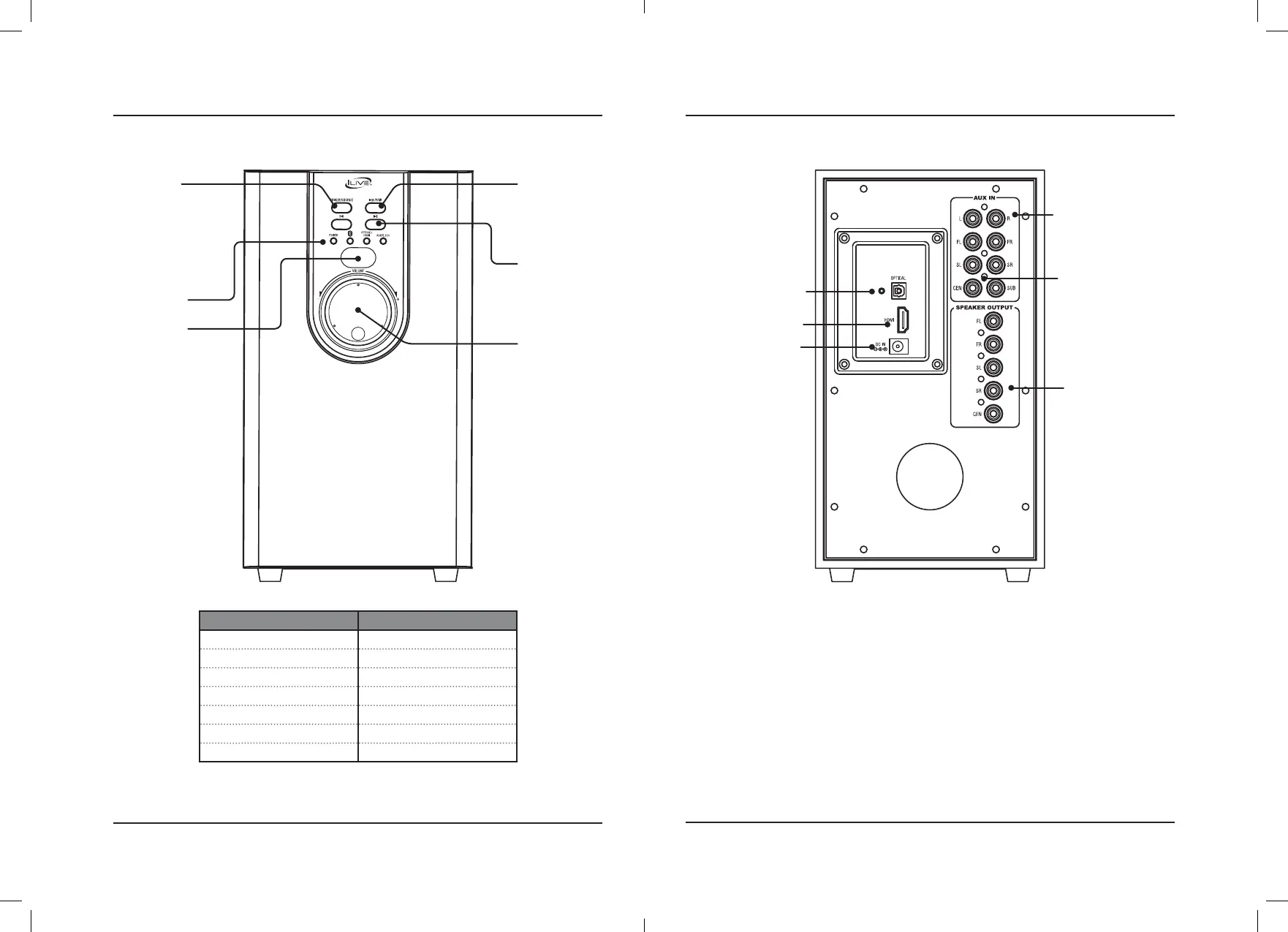
Subwoofer Rear ViewSubwoofer Front View
Stereo Audio Inputs
Optical Audio Input
HDMI Audio Input
DC Power Input
Surround Sound
Audio Inputs
Audio Outputs
(to speakers)
Orientation
Volume Dial
Turn to adjust
volume level.
Skip
Press to skip
forward or
backward on
an audio track
(BLUETOOTH).
Speaker Status Indicator Light
Power ON Red Light
Bluetooth Pairing Rapid Flashing Blue Light
Bluetooth Connected Solid Blue Light
Optical Mode Orange Light
HDMI Mode Purple Light
Aux In Mode (RCA Stereo) Green Light
5.1 Surround Sound Mode White Light
LED Indicator
Lights
Remote Signal
Receiver
Power/Source
Press to power ON.
Press and hold to
power OFF.
Press to switch
between Bluetooth,
Optical, HDMI, Aux
In, and 5.1 Surround
Sound Modes.
Play/Pause/Pair
Press to play or
pause audio.
Press and hold to
begin pairing to a
Bluetooth device.


 To Next Page