14
15
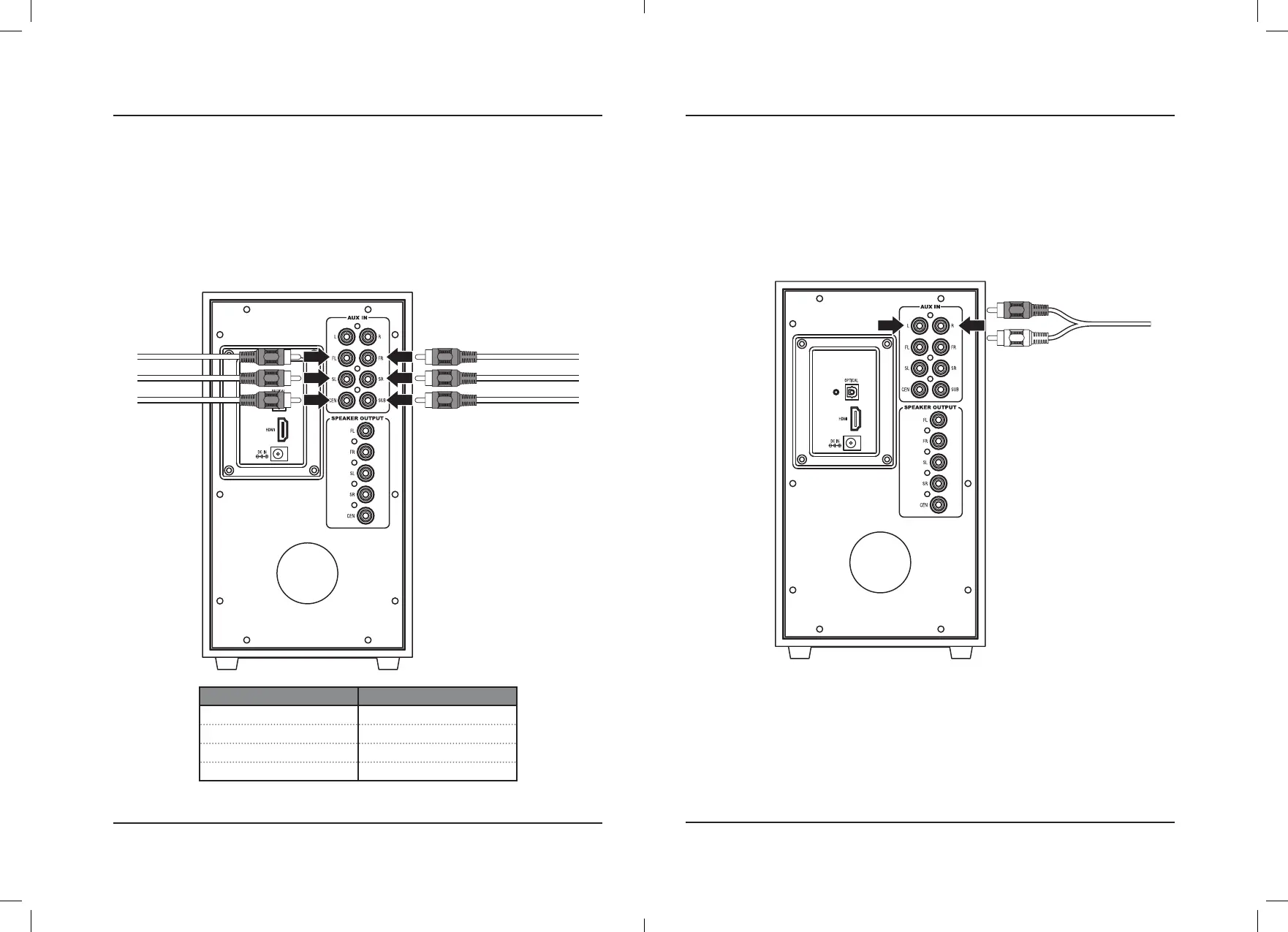
6 Port 5.1 Surround Sound RCA Inputs (5.1 CH)
If your TV, DVD, or other media player has 6 ports of audio output, use the 6 lower audio inputs on the rear of the
subwoofer for 5.1 surround sound audio.
Requires 3 RCA stereo audio cables (included).
1. Using an RCA stereo audio cable, connect your media player’s Surround Sound stereo outputs to the to the
Surround Sound inputs on the subwoofer. When connecting the audio cables, match the colored plugs to the
same colored ports.
2. With the unit powered ON, select Surround Sound Mode through the Source button on the subwoofer or
through the 5.1CH button on the remote. A voice prompt and a solid white light will indicate that Surround
Sound Mode has been selected.
Audio Input Audio Channel
FL / FR Front Left / Front Right
SL / SR Surround Left / Surround Right
CEN Center
SUB Subwoofer
2 Port Stereo RCA Inputs (Aux)
If your TV, DVD, or other media player has only 2 ports of audio output, use the top 2 audio inputs (Left/Right
channel) on the rear of the subwoofer for stereo audio.
Requires an RCA stereo audio cable (included).
1. Using an RCA stereo audio cable, connect your media player’s RCA stereo outputs to the to the RCA stereo
inputs on the subwoofer. When connecting the audio cables, match the colored plugs to the same colored ports.
2. With the unit powered ON, select Aux Mode through the Source button on the subwoofer or through the Aux
button on the remote. A voice prompt and a solid green light will indicate that Aux Mode has been selected.
Audio Inputs


 To Next Page