To download this User’s Guide in English, Spanish, or French, or to get answers to frequently asked questions, visit the support section at:
www.iLiveElectronics.com
Para descargar este Manual del Usuario en inglés, español y francés, o para obtener respuestas a preguntas frecuentes, visite la sección de
apoyo en: www.iLiveElectronics.com
Pour télécharger ce guide de l’utilisateur en anglais, espagnol ou français, ou pour obtenir des réponses à des questions fréquemment
posées, consultez la rubrique d’assistance sur: www.iLiveElectronics.com
Customer Service: 1-888-999-4215 | Email Support: prodinfo@dpiinc.com | Email Parts: partsinfo@dpiinc.com
Copyright © 2017 Digital Products International (DPI, Inc.) All other trademarks appearing herein are the property of their respective owners.
Specications are subject to change without notice.
Customer Support
Protect for Today
Sustain for Tomorrow
Made
Green
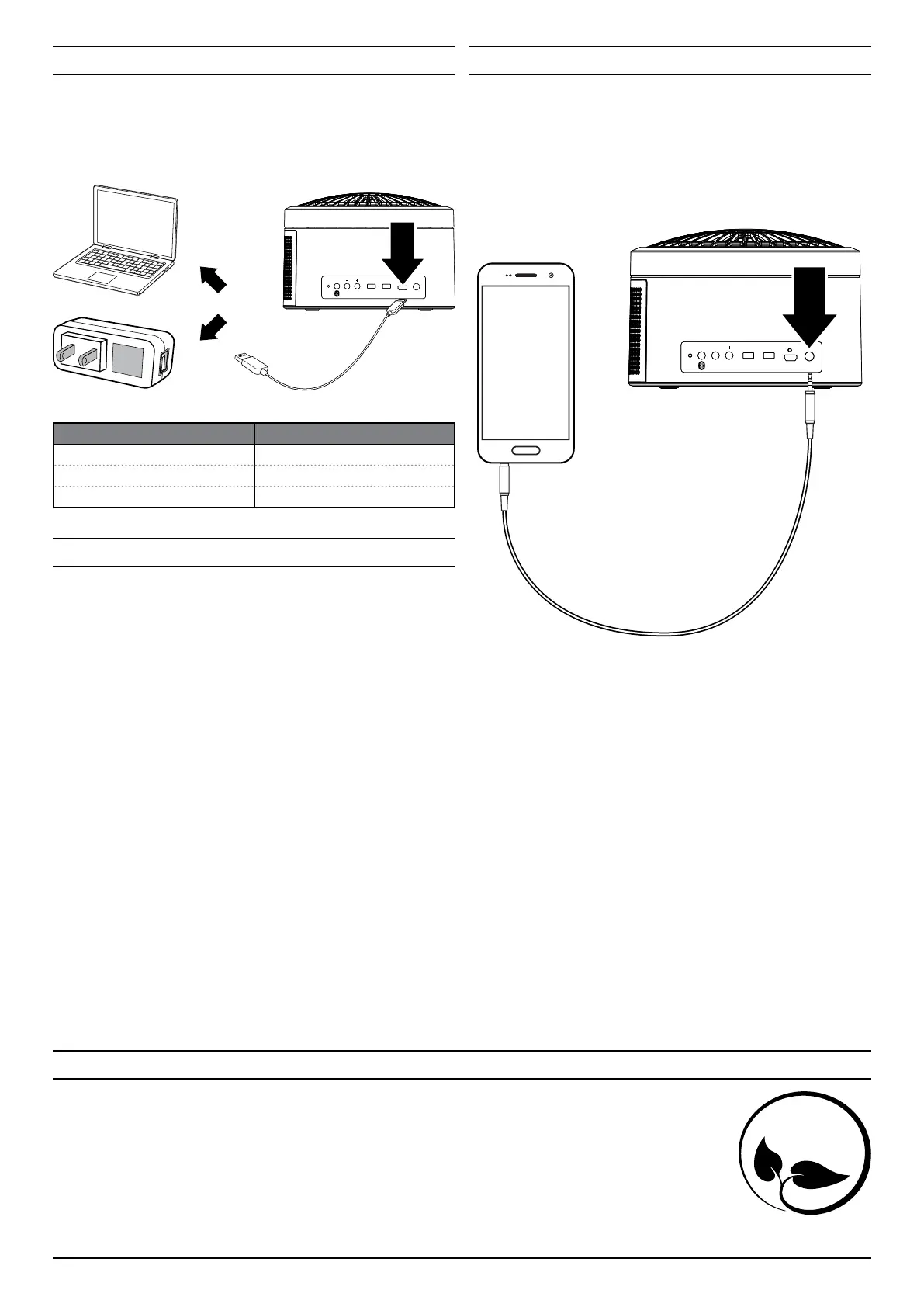
Aux In
Requires a 3.5mm audio cable (not included).
1. Connect a 3.5mm audio cable to the Aux In on the unit and the
audio output/headphone jack on an audio device.
2. The speaker will automatically switch to Line In Mode (“LINE” on the
display).
3. Use the controls on the connected device to select and play audio.
PAIR SPEAKERVOL FAN
DC IN AUX IN
OFF ON OFF ON
Bluetooth Wireless
Pairing to a Device & Playing Audio
After initial pairing, the unit will stay paired unless unpaired manually by the user
or erased due to a reset of the device. If your device should become unpaired or
you nd it is unable to connect, repeat the steps listed here.
1. Press and hold the Pair button to begin pairing. The pairing indicator will
begin quickly ashing blue. Remain within 3 feet of the unit.
2. Using the controls on your Bluetooth device, scan for and select ISB298B in
your Bluetooth settings to pair. If your device requests a password, enter the
default password 0 0 0 0 . Refer to the user’s manual for your specic device for
instructions on pairing and connecting Bluetooth devices.
3. When successfully paired, the pairing indicator will turn solid and an
audible chime will sound from the unit.
4. Use the controls on the connected device to select and begin playing audio.
Audio played through the connected Bluetooth device will now be heard
through the speaker. Use the controls on the speaker or the connected
device to play, pause, and adjust volume.
Previously Connected Devices
• The speaker can remember multiple Bluetooth devices and will always try to
re-connect to the last device used.
• To re-connect to a dierent device, turn o Bluetooth on unwanted devices,
then access the Bluetooth settings menu on the device you wish to use and
select ISB298B.
PAIR SPEAKERVOL FAN
DC IN AUX IN
OFF ON OFF ON
Charging the Battery
Requires a Micro-USB to USB cable (included). For best performance, charge fully
before use.
• Using a Micro-USB to USB cable (included), connect the DC Power Input
on the speaker to the USB port of a powered on computer or USB power
adapter (not included).
INDICATOR LIGHT BATTERY STATUS
Red light ON Charging battery
Red light OFF Charging complete
Red light ashing Low battery, charge soon


 To Previous Page
 Loading...