CONNECTING POWER
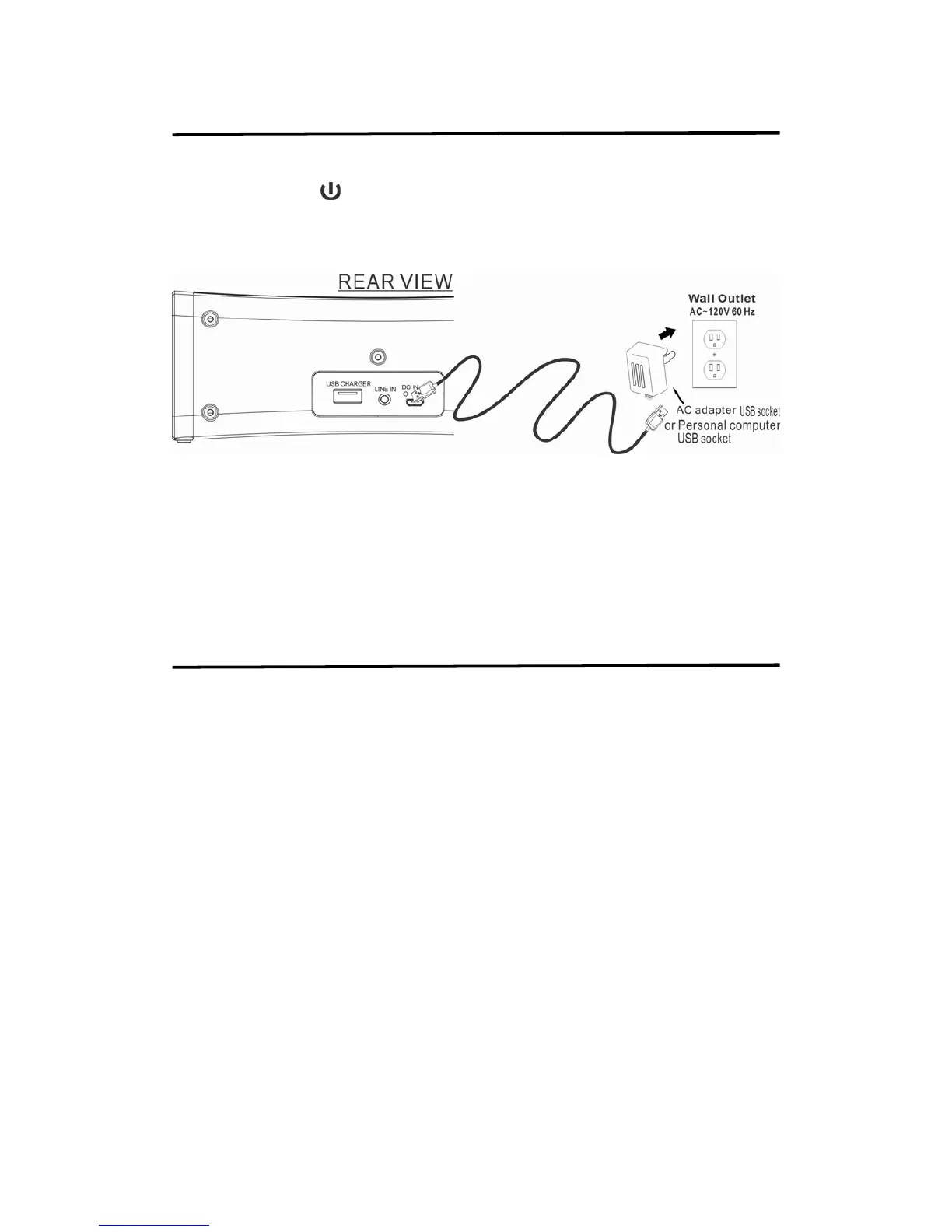
Plug the micro USB of the supplied cord into the DC IN USB jack at the back of the unit. Plug
the other end USB jack to the adapter USB socket and plug the adapter body into the standard
AC wall socket. Press
button to turn on or off unit (standby mode).
Blue color indicator light = Unit turn on Bluetooth mode.
Green color indicator light = Unit turn on Line In mode.
CAUTION:
The unit is designed to operate from a mains supply of AC 120V~60Hz. If the adapter
does not fit properly, turn it over and again. Do not force it.
NOTE: When the unit is not operated by the AC power or unused for long periods of the
time. Please remove the power adapter from the wall outlet and unplug from the main
unit.
USING THE BUILT-IN BATTERY
Built-in battery for power operation
1. Connect AC power following “CONNECTING POWER” step.
2. Red LED indicator light on speaker grill
3. After approximately 8-10 hours, the red LED indicator light off means fully charged.
4. Remove the adapter from the back of the unit to operate the unit.
5. At this moment, the unit can operate by built-in battery.
N0TES:
1. Do not open batteries.
2. Do not dispose of batteries in fire.
3. Do not heat up batteries.
4. Do not expose batteries to water.
.


 To Next Page