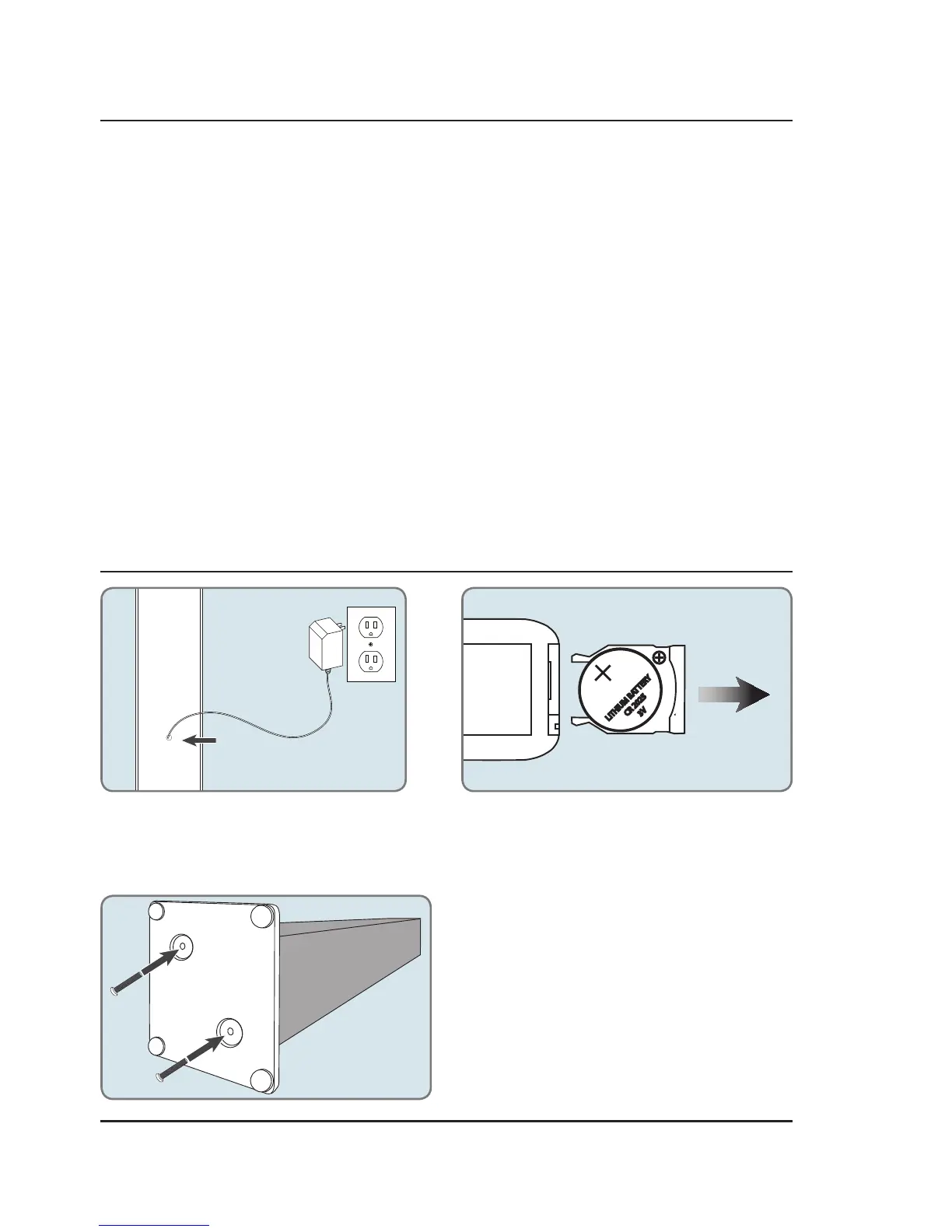
LITHIUM BAT
TER
Y
CR 2025
3V
Out
Slide
Remote Battery
Requires a CR2025 battery (pre-installed).
Power
Plug the small end of the power cord into the
DC Input on the back of the speaker, and the
large plug into a standard wall outlet.
Unboxing Your HD Tower Speaker
Setup
Features & Specications
• Supports Bluetooth v2.1
• Wireless range: 33 feet
• Pairing button
• Built-in 4 x 3" high power speakers
• LED light effects
• Digital FM radio (PLL)
• Station memory presets (20 FM)
• 3.5mm audio input
• RCA stereo audio inputs
• Built-in FM wire antenna
• Negative LCD display with white backlight
• EQ presets
• Digital volume control
• Bass controls
• Treble controls
• Digital clock
• Remote
• Supports Enhanced Data Rate (EDR)
• Supports profile A2DP (Advanced Audio
Distribution Profile)
• DC power input: requires an AC/DC power adapter
(included)
Features & Specications
• Remote control:
requires a CR2025 battery (pre-installed)
• RCA stereo audio cable
• AC/DC power adaptor
• Wooden stand and mounting hardware
Attaching the Stand
Align the holes in the bottom of the unit to the holes
in the base. Use a philips-head screwdriver to tighten
or remove the screws. Using an power drill could
damage the TV stand.



 To Next Page