11
Optical Input
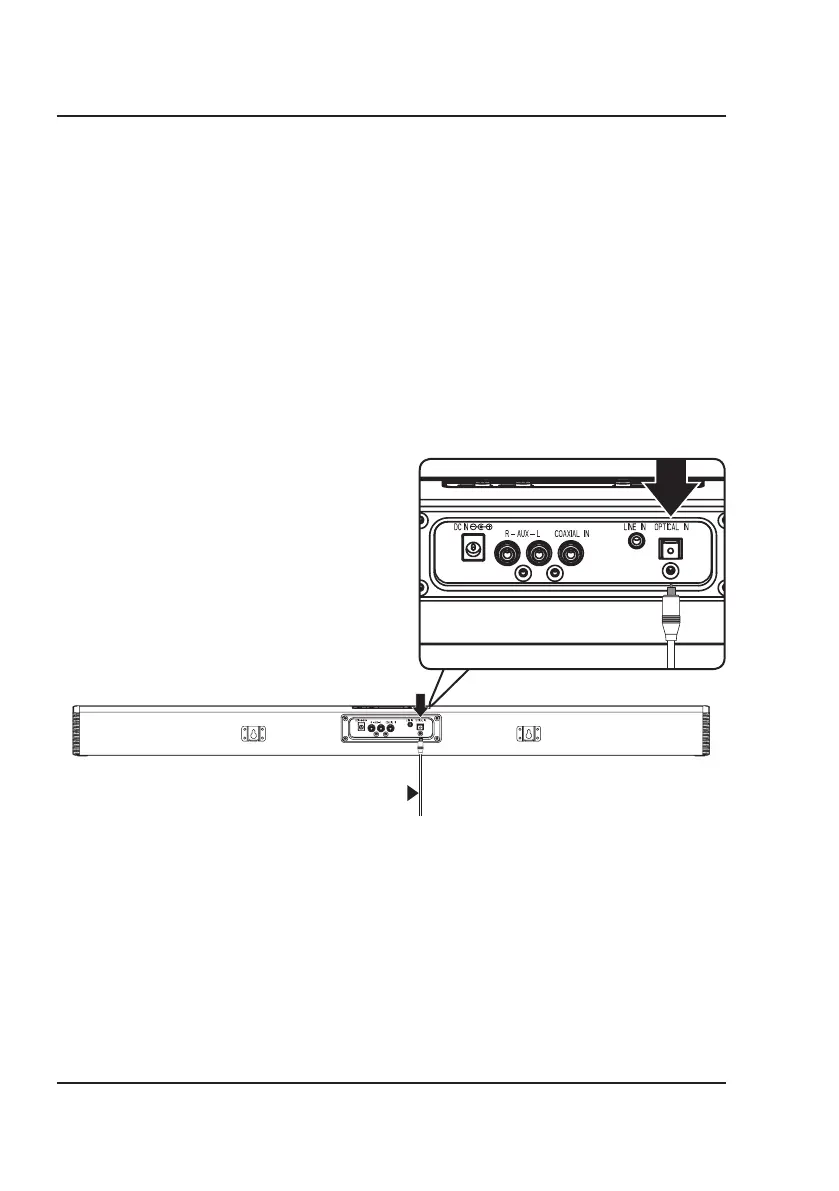
Requires an audio source with an Optical Audio Output and a Digital Optical Audio Cable (included).
1. Using a Digital Optical Audio Cable, connect the Optical Input on the sound bar to the Optical Output on your
audio source (TV, amplifier, etc.).
2. Power ON the sound bar and press Optical on the remote or Source on the sound bar to select Optical Mode.
A voice will announce the source mode and the indicator will turn orange.
3. On the connected audio source (TV, amplifier, etc.), be sure the audio settings are set to PCM or Optical Audio.
4. Audio played through the connected audio source (TV, amplifier, etc.) should now be heard through the speaker.
Important tips for optical audio:
• Use the correct optical audio cable and make sure that it is firmly seated in both source and sound bar sockets.
• Optical audio output is activated from the audio source (a red light should be visible from the optical socket). It
may be labeled SPDIF in the settings menu of the source.
• The optical output source should be set to output PCM and not Dolby Digital.
Connect optical audio cable
(included) to audio source


 To Next Page