9
Initial Bluetooth Connection and Playing Audio
1. Power on the sound bar by pressing and holding the Power button. A voice will say, "Bluetooth," and the LED
indicator will slowly flash blue. When pairing, remain within 3 feet of the Bluetooth device.
2. Using the controls on your Bluetooth device, select ITB259 in the Bluetooth Settings to pair. If need be, refer to
the user’s manual for your specific device for more information.
3. When successfully paired, a voice will announce “Bluetooth is connected” and the LED indicator will turn solid
blue. Audio from the connected Bluetooth device will now be heard through the speaker.
4. Use the controls on the connected Bluetooth device to select and play audio. Use the speaker controls or the
connected Bluetooth device to play, pause, and adjust the volume level.
5. After initial pairing, press and hold
until the voice prompt says “Power on.” The speaker will power ON and
automatically connect to the last Bluetooth device used. Note: If your device should become unpaired or
you find it is unable to connect, press & hold the
button to enter to Pairing Mode. A voice will announce
“Bluetooth is connecting” and you can connect to the speaker manually.
Note: This soundbar has last function memory after turn OFF, it will resume last mode when turn ON the soundbar
again. Remind to press the
button to switch it to bluetooth mode before connecting.
Previously Connected Devices
• The sound bar can remember multiple Bluetooth devices and will always try to re-connect to the last device used.
• To re-connect to a different device, turn off Bluetooth on unwanted devices, then access the Bluetooth settings
menu on the device you wish to use and select ITB259.
Troubleshooting
If the sound bar should become unpaired or will not connect normally, follow these steps in your device’s Bluetooth
Settings Menu.
• Delete the sound bar (“Forget This Device”).
• Turn Bluetooth OFF, then ON again, and repeat the Initial Bluetooth Connection steps.
Connecting Devices
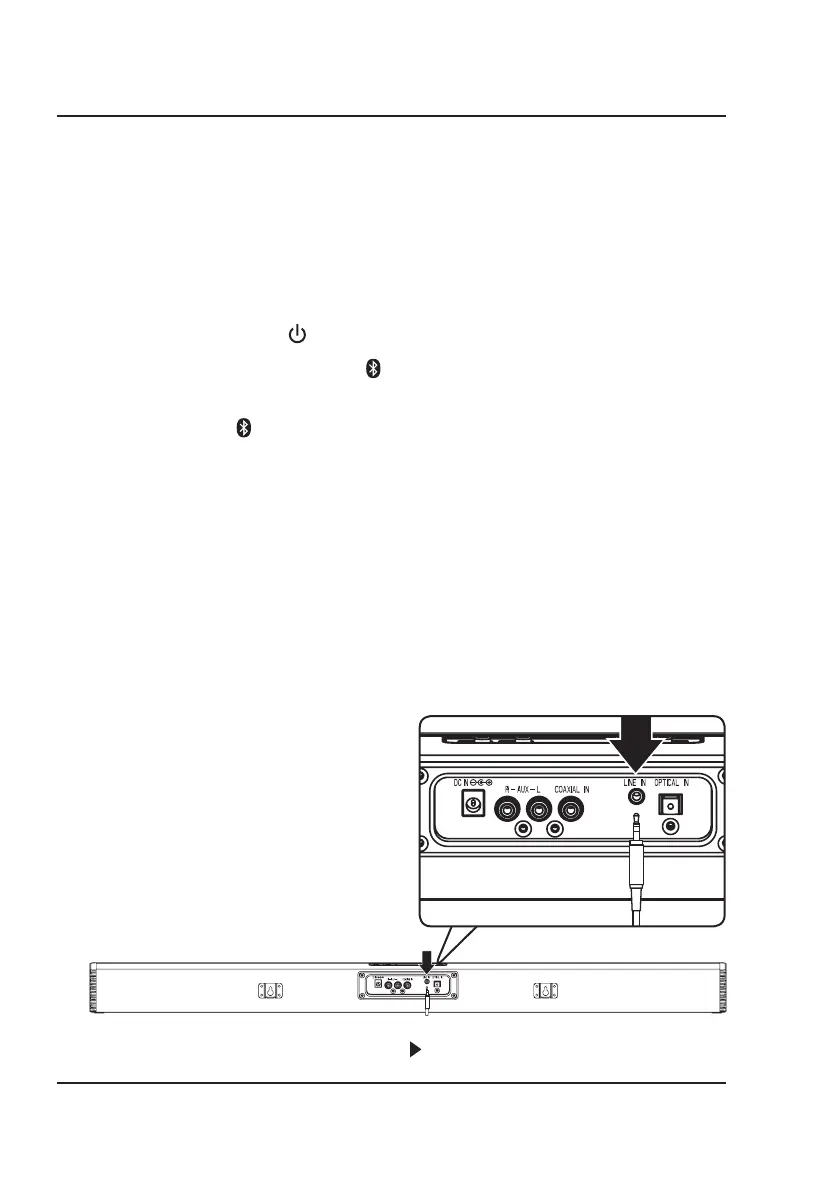
Line In
Requires a 3.5mm audio cable (not included).
1. Connect a 3.5mm audio cable to the Line In on the
unit and the audio output/headphone jack on an
audio device.
2. Power ON the sound bar and press Source on the
sound bar or Line In on the remote to select Line In
Mode. A voice will announce the source mode and the
indicator will turn green.
3. Use the controls on the connected device to select
and play audio. Be sure the volume on your connected
device is audible when you begin playing.
Connect 3.5mm audio cable
(not included) to audio source


 To Next Page