5
ITP180B User GuideCustomer Helpline Number: 0844 481 5000
iPod
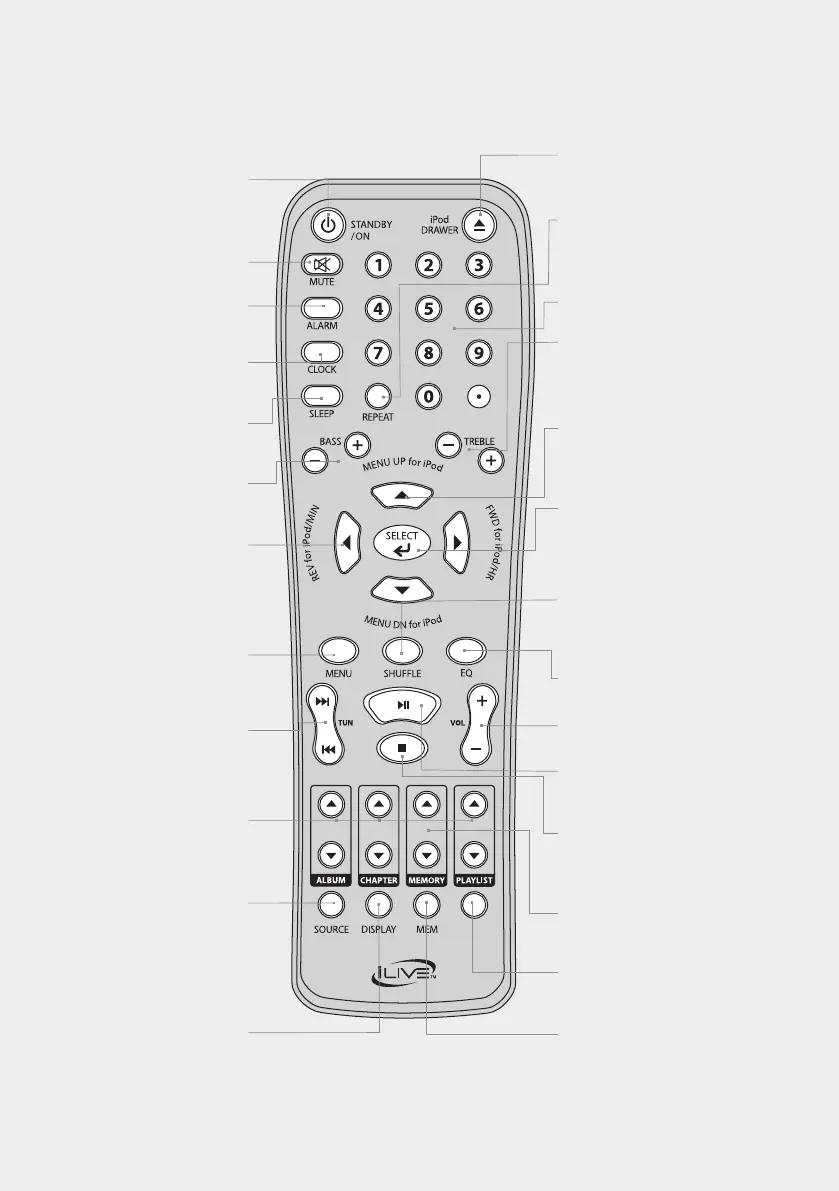
ALARM
With the power off, press
tosetthealarm.
MUTE
Presstomutethevolume.
CLOCK
With the power off,
press to set the clock.
SLEEP
Press repeatedly to set the
sleeptimer.
BASS
WiththeEQsettoFLAT,press
to adjust the levels of bass.
REV/FWD/MIN/HR
Press to rewind or fast
forward a docked iPhone
or iPod. Press to adjust the
hourandminutewhen
settingtheclockoralarm.
MENU
Presstooperatemenusona
docked iPhone or iPod.
TUN/SKIP
Press to skip between
tracks on a docked iPhone or
iPod. Press to tune the radio.
ALBUM/CHAPTER/ PLAYLIST
Presstoskipthroughalbums,
chapters, or playlists on a
docked iPhone or iPod.
STANDBY/ON
Press to turn the bar
speaker off or on.
SOURCE
PresstoswitchbetweenAV,
AUX,FM,andiPhone/
iPodmodes.
DISPLAY
Press to view the clock on
the display
iPod DRAWER
Press to open or close the
motorizeddockforiPhone/iPod.
NUMBER KEYPAD
REPEAT
Press to repeat a single track
orentirealbumonadocked
iPhone or iPod.
TREBLE
With the EQ set to
FLAT,presstoadjust
the levels of treble.
MENU UP/DN
Press to navigate upand
downinmenusona
docked iPhone or iPod.
SELECT
Presstomakeselections
on a docked iPhone
or iPod.
SHUFFLE
Press to play songs
fromadockediPhoneor
iPodinarandomorder.
EQ
Press to adjust the EQ.
VOLUME
Presstoadjustthevolume.
PLAY/PAUSE
Press to play or pause a
docked iPhone or iPod.
STOP
Press to stop a
docked iPhone or
iPod during play.
MEMORY
Press to cycle through
saved radio stations.
iPod
Press to switch to iPhone/
iPodmode.
MEM
Press to save a radio station
tothebarspeaker’smemory.


 To Next Page