7
ITP180B User GuideCustomer Helpline Number: 0844 481 5000
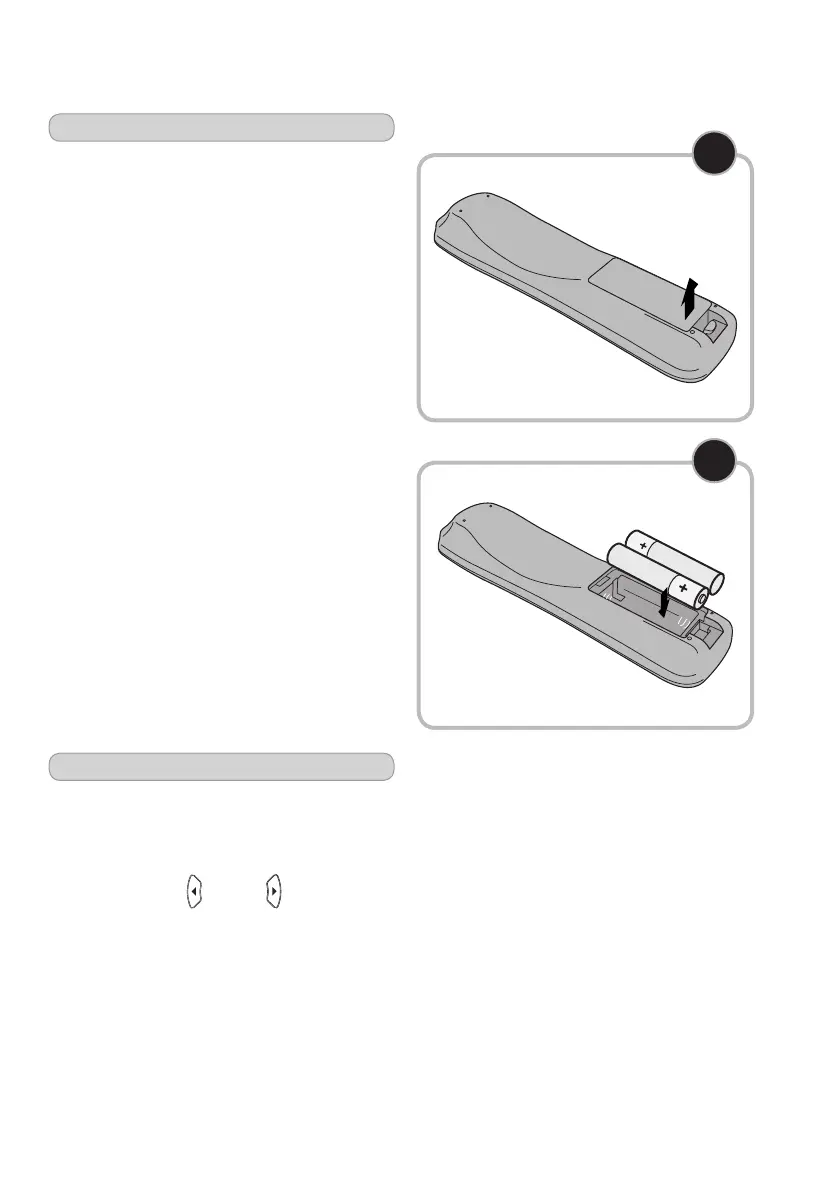
The remote control battery
Youwillneedtoinsert2AAAbatteries
(notincluded)intotheremoteas
described below.
1Removethebatterycoverfromthe
backoftheremoteasshown.
2 Insert the batteries as shown. Make
sure you place the batteries in with
thepositive(+)andnegative(-)ends
the correct way round.
3 Replace the battery cover.
2
1
Setting the time
1 Withthemusicsystemoff,pressthe
CLOCK buttononyourremotecontrol.
Thetimewillbeginblinking.
2 Press the MIN and HR buttons on
theremotetoadjusttheminuteandhour.
3 Wait5secondstofinishsettingtheclock.


 To Next Page