16
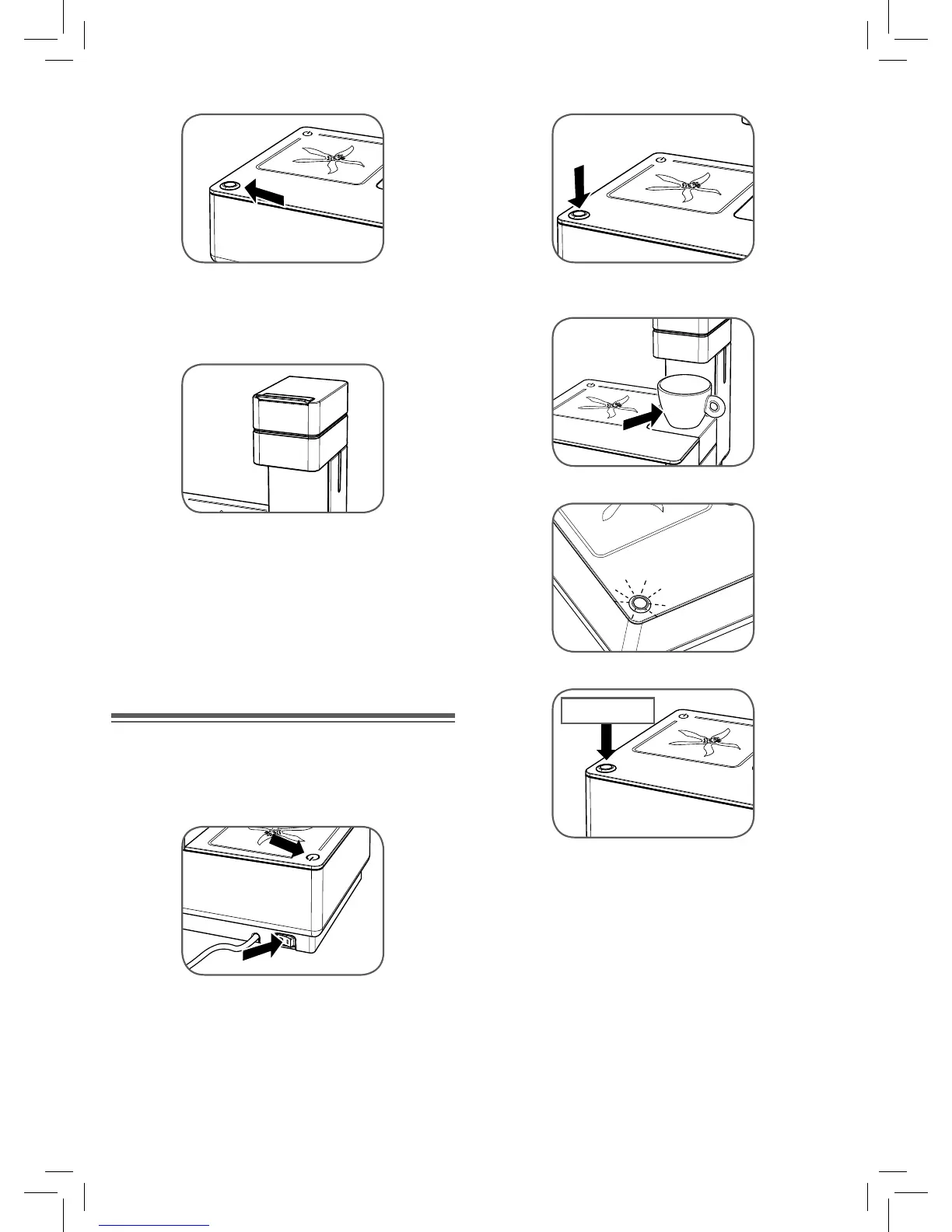
Make sure that the coffee button ”F” is not pressed .
Insert the plug into the outlet. Consult the following chapter to
switch on the appliance.
Caution: make sure that the capsule compartment “B” is
closed before brewing coffee. Never open the compart-
ment during the dispensing of coffee.
Note: When using the machine for the fi rst time or after it
has not been used for 7 or more days, we suggest running
at least half a tank of water through the brew group wi-
thout inserting a capsule.
TURNING ON/OFF
To turn on the machine, proceed as follows:
Check the water level in the tank “L”; if necessary add water
as previously described.
Move the main on/off switch “M” into the “I” position. The indi-
cator LED “D” will light up.
The machine will start warming up; the temperature ready LED
of the coffee button “F” will remain off.
Place a cup beneath the brew group.
Wait until the temperature OK indicator “F” lights.
Start/Stop
Press the coffee button “F”.
Wait until water fl ows out of the brew group.
After fi lling a cup with hot water, press the coffee button “F”
again to stop fl ow.
Before switching off the machine, we recommend running
about a cupful of hot water through the brew group with
the capsule compartment “B” empty.
To switch the machine off, move the main on/off switch
“M” into the “0” position; never disconnect the plug from
the power outlet when the machine is switched on.


 To Next Page